Changelog
New features, improvements and fixes. Everything we ship to Jamie, in one place.
Decide who can do what in your workspace
With Resource Based Access Control (RBAC), enterprise admins can now set who is allowed to share meetings, export them, read transcripts, use Ask AI and connect each integration. Everything lives on a new Permissions page in Settings, and settings for your workspace now have their own home too.
What admins can now do:
Set each permission to Everyone, Admins only, Specific people or No one
Give access to named teammates one by one
Control every integration separately, grouped by category with a filter
Find it all on the new Permissions page under Settings
Review every change in the audit log
Available on the Enterprise plan.
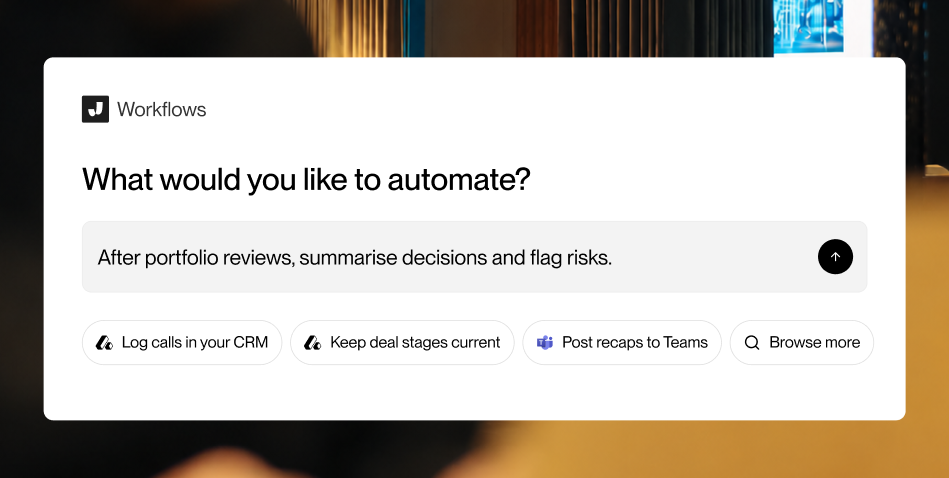
Agentic Workflows act on your meetings for you once they end. Describe what should happen in chat, for example, filing the notes in your CRM, creating tasks from the action items, or posting a summary to a channel. Jamie builds the workflow, you review it, and you switch it on.
What you get in this release:
Build in chat. Tell Jamie what to do after which meetings. It proposes the steps, you adjust them, and it publishes.
Two write modes. Automatic workflows write on their own. Workflows that require approval wait and show you exactly what they're about to do, then you choose Run or Skip.
Connectors with their own pages. Every connector now has a page showing what it can do, with a Connect control, accessible from Settings, Agent, Connectors, or directly from the Agentic Workflows page.
Runs you can follow. See what ran on each meeting, what needs your attention, and the history of every workflow.
For teams. Workspace admins can connect an app for the whole workspace and build workflows that run on every member's meetings. Available on Team and Enterprises.
We're rolling out Agentic Workflows gradually. Sign up for early access here.
🤖 Auto-start recording
Never miss the start of a meeting again. Jamie can now start recording automatically the moment your meeting begins — no clicks required. Combined with your calendar, Jamie knows when it's time to listen.
⏳ Countdown before recording
You stay in control: before an auto-started recording begins, Jamie shows a countdown so you can see what's coming — and cancel with one click if you'd rather sit this one out.
🛑 AutoStop
Meeting over but recording still running? Not anymore. Jamie detects when your meeting has gone silent and stops the recording for you.
📫 Reminders you can rely on
Calendar reminders are scheduled directly on your device. The result: reminders that fire on time, every time — even offline or on a flaky connection.
⏰ Choose your lead time
Configure how many minutes before a meeting Jamie reminds you — right in your settings.
🔗 Pipedrive integration
Push meeting summaries and tasks to your Pipedrive CRM.
🔗 Microsoft Dynamics 365 integration
Sync notes and action items to Dynamics 365 Sales.
🖼️ Workspace logo
Upload a custom logo to brand your Jamie workspace.
📐 Recorder size preference
Choose between compact and expanded recorder modes — Jamie remembers your preference.
🏃 Live Activities on iPhone
Track your active recording from the iPhone lock screen and notification banner.
✏️ Richer note editor
New formatting options in the notes editor, including better highlight and block-level controls.
🏷️ Shared tags
Create tags that are visible and usable across your whole team — tag meetings consistently and filter by topic collaboratively.
📝 Scratchpad
A persistent scratchpad lives alongside every meeting so you can jot down thoughts without cluttering your structured notes.
✅ Tasks on iOS
Create, view, and filter tasks from the iPhone app.
🔍 Improved search
Faster, more reliable search across your meeting history.
📱 iOS app redesign (v2.0)
Complete visual and structural overhaul of the iPhone app — cleaner navigation, faster access to meetings, notes, and tasks.
⚡ Live summary streaming
See your meeting summary appear word-by-word as it's generated — no more waiting at the loading screen.
🌎 Brazilian Portuguese support
Jamie now supports Brazilian Portuguese as a meeting language.
☑️ Multi-select in meeting list
Select multiple meetings at once to bulk-apply actions like tagging or sharing.
🔄 Tasks sync via integrations
Integrations (HubSpot, Notion, Linear, etc.) now push action items in addition to meeting notes — your tasks flow to where your team works.
📅 Improved calendar integration
More reliable calendar sync with better handling of edge cases and permission prompts.
🚀 Getting started screen
New onboarding experience with a getting started checklist and a refreshed meeting list layout to help new users hit the ground running.
📧 Consent email notifications
Send automated pre-meeting consent emails to participants before Jamie joins a call.
🌍 English language variants
Added support for regional English variants (UK, Australian, etc.) for more accurate transcription.
🎨 Calendar color on meetings
Meetings now display their associated calendar color for quick visual orientation.
🧾 Summary templates
Summary Templates are now live! You can choose from our pre-defined templates or create your own custom template in exactly the format you need. Templates can be applied to meeting notes even after they’ve been generated, giving you full flexibility without needing to re-run a meeting. And what's even better is that you can share your templates with colleagues within Jamie so you can all benefit from the same structure!
🗣️ Speaker memory
Jamie now automatically assigns speaker names based on your calendar events and what’s said during the meeting. It can also remember participants from previous meetings and recognize them again in future ones, resulting in more accurate and consistent speaker attribution over time.
📝 Scratchpad
With the new scratchpad, you can take personal notes while the meeting is still recording - no more switching between apps. Scratchpad notes are kept separate and are not automatically included in Jamie’s generated summary, so you stay fully in control of what goes into your meeting notes.
👥 Team sharing
You can now share meetings directly within Jamie. When you share a meeting with a colleague from your workspace, it appears in their “Shared with me” tab, where they can instantly read through the summary. This feature is available for Team and Enterprise plans only.
📱 Mobile app
Our brand-new mobile app for iOS is finally here! Record your meetings, read your summaries, and chat with Jamie's AskAI on the go with a sleek, responsive design and full synchronization across all your devices. The app is available in the AppStore.
🧩 New integrations
We’re expanding our ecosystem! With the latest update, you can now connect to more of your favorite tools — like Hubspot, Notion, or OneNote — making your workflow smoother and more connected than ever.
🌑 Dark mode is back
By popular demand, dark mode has returned! Enjoy the comfort of reduced eye strain and a stylish, low-light interface that adapts perfectly to your environment.
💎 Improvements
Enhanced diarization: We’ve significantly improved our speaker diarization engine, making speaker detection and differentiation more accurate for your meetings.
Optional mic-based reminders: You can now disable the mic-based reminders or granularly define applications as exceptions from which the notification will not be triggered.
🚀 v5 is Here
Version 5 is now live! This update brings with it a completely renewed base that allows us to move faster, build smarter, and deliver better experiences across the board.
⚡ Back to Fast Iteration
We’re back to shipping quickly and improving Jamie week after week. Expect more frequent updates, new features, and polished experiences rolling out at a much faster pace.
📣 What’s Next
This is just the beginning. You’ll be hearing a lot more from us — exciting launches, behind-the-scenes insights, and a wave of improvements designed to make Jamie even more powerful.
⏳ Extended meeting time
Jamie now supports recordings for up to 3-hour meetings, available in all paid plans.
💎 Improvements
Improved onboarding flow
Clicking on the tray icon on Windows opens Jamie
🐞 Bugs fixed
See all available summary languages in the settings
Only one process of Jamie is running (no unnecessary computing power)
The chat in the sidebar is working again
The auto updater works again
Fixed "Start Meeting" issues some users faced
📄 New shared summary page
Your shared summaries got a new glow-up! The summaries you share with friends and colleagues are presented in the same clean design as the whole Jamie application to deliver you the smoothest user experience possible.
💎 Improvements
You'll get informed about available updates to never miss new features or fixed bugs again
Find & Replace function also replaces tasks & decisions now
New fancy "Start Meeting" button 💅
🐞 Bugs fixed
Dropdown values are capitalized
💻 Apple Silicon version available
You can now download the version tailored for Apple M1/M2/M3 chips on the website to get the most speed out of your Jamie application.
💎 Improvements
Shortcut " CTRL+, " opens settings on Windows
🐞 Bugs fixed
Instant reactivity when changing your preferences regarding the sidebar (de-)activation
🎙️ New speaker identification dropdown
Jamie now suggests speakers from past meetings in a dropdown, making identification quicker and easier.
💎 Improvements
Improved onboarding journey for new customers
💸 Need a discount?
You can now enter discount codes right when subscribing to the plan that's fitting your needs and enjoy Jamie to your desire.
💎 Improvements
Meeting control stays visible when hiding the main window using cmd+h / ctrl+h while recording a meeting
🐞 Bugs fixed
Layout of dropdowns has been fixed
🆔 Robust speaker identification
We’ve enhanced the speaker identification after meetings for better accuracy and reliability.
💎 Improvements
Links from the sidebar chat open in a new browser window by default
Added discount code to the sign-up flow
The creation of duplicate labels is not possible anymore
The main window of Jamie stays hidden when you open the sidebar (given you hid the main window before)
Jamie will not show declined calendar events in your upcoming meetings anymore
🐞 Bugs fixed
"Add payment" button is disabled until valid card info has been entered
Upcoming meetings show in full width
⚡️ Sidebar downtime
After yesterday's release, the sidebar was not generating responses on Windows anymore. We took direct action and fixed it with today's release.
💎 Improvements
Added lock behind "Start meeting" button to avoid accidental double recordings by double clicks
Make jamie go to the last meeting when we stop it from the meeting control and we are currently at a different place in the app
🐞 Bugs fixed
Company billing issue that data would not load and the meetings wouldn't start is fixed
🎙️ New Windows Recorder
As we know, a lot of you have experienced issues with using Jamie on Windows. We've finally tackled these issues. The new version ensures you can get the most out of Jamie without any hassles.
💎 Improvements
Include the year of a meeting if it happened in previous years for clarity
Not showing declined calendar events in upcoming meetings list
Don't show calendar notification when being in a meeting
🐞 Bugs fixed
When starting a new meeting, you will (again) be redirected to that new meeting
Overlay of generated output and the chat bar is fixed in the sidebar
📧 Outlook Integration
We've fixed the Outlook integration! Now, connect effortlessly and stay on top of your important appointments.
💎 Improvements
Audio clips will not added to your cache. That means it will not affect your play button of your Mac.
🐞 Bugs fixed
Send/Stop button of sidebar chat is reactive again
🎙️ Robust database
We've switched from RXDB to Firestore, making Jamie sturdier and reducing those pesky application failures.
💰 More Bang for Your Buck
Enjoy increased meeting limits in each subscription plan without any price hikes. Get more out of Jamie!
💎 Improvements
Code blocks within the sidebar responses now include a copy button
Improved meeting notes generation which leads to lower meeting failure rate
🐞 Bugs fixed
Emails with uppercase letters don't cause errors in sign-in/sign-up anymore
🎙️ New Windows recorder
The wait is over! Our new Windows recorder is here to elevate your Jamie experience to the max.
💎 Improvements
Notifications are not steeling focus from any application you are currently working in
🐞 Bugs fixed
Template selection stays put when navigating through the app
Company billing issues are resolved
💡 Always up to date
Never miss a beat! Jamie now sends reminders if you're on an outdated version for over 2 days. Stay updated effortlessly.
💎 Improvements
Notifications are not steeling focus from any application you are currently working in
You can now decide whether you'd like to receive emails with updates and news from jamie when signing in or registering
🐞 Bugs fixed
Meetings up to 120 minutes possible again (for paid plans)
💬 Executive Assistant Sidebar
Imagine having a powerhouse of AI at your fingertips. That’s Jamie’s new sidebar! Integrated with the latest public AI models like GPT-4 and Opus-3, plus Jamie’s own tech, it’s your go-to for anything from past meeting intel to daily task help. Just hit CMD/Ctrl + J to summon Jamie whenever you need!
🎮 Share the Jamie Love
Got friends who’d dig Jamie? Our new gamified referral program rewards you for spreading the word. Invite buddies, level up, and snag exclusive perks.
🧑🏫 Smooth Onboarding
New to Jamie? We’ll walk you through a fun, engaging onboarding journey to get you using all of Jamie’s cool features with zero fuss.
💎 Improvements
Performance speed was enhanced so jamie can work even faster for you
Note from jamie when a meeting is in risk of being too short for summarization
🐞 Bugs fixed
Database issues have been fixed which led to some customers not being able to start meetings
📤 High-speed performance
Fed up with slow apps? Jamie's latest update trims the fat, ditching unnecessary processes for a sleeker, quicker response. Open and operate at the speed of light—no more waiting!
🎙️ Crisp audio recorder
Dive into clarity with our new audio recorder. Expect robust, high-quality summaries thanks to improved sound capture.
💎 Improvements
Occasional information about how to use jamie's features best will be shown
🐞 Bugs fixed
Summary sharing works again
Google Calendar integration is fixed
📤 One-Click Sharing
Tired of copy & paste? Now, a single click lets you shoot summaries directly to meeting members or external contacts. Quick, easy, done. With just one click, you can automatically send out an email to the desired recipient.
☄️ Summary Excellence Unleashed
We are excited to announce a major improvement for the meeting summaries jamie creates. We upgraded to newer models delivering the best summaries in the world for meeting reliably. This includes:
Enhanced structure supporting sub-points in meeting notes to allow for easier reading of notes
Increased level of detail and extensiveness capturing details of meetings in unseen granularity
Max meeting duration increased from 90 to 120 minutes
We are eager to hear how we can push this even further. Let us know your feedback right in jamie.
💎 Improvements
Extended meeting times up to 120 minutes
🎙️ "Psst, Hit Record!"
Started talking without hitting 'record'? Jamie's here to remind you, “Time to record!”. Simple, helpful nudges to make sure you capture every important word of your meetings.
💎 Improvements
You're now able to activate or deactivate the meeting controls in your preferences settings
🕹️ Control jamie from anywhere
🎛️ Meeting controls
No more app juggling! With the new meeting controls, you can now command jamie without even having the app open. See how long your meeting's been running and stop it with a single tap. Plus, it's like having a personal reminder on your screen, so you'll never forget to end a meeting again!
💬 Chat 2.0 is here! (Beta)
Wondering about that one thing from last week's meeting? Just ask jamie! Our AI assistant will give you a beautifully formatted, copy-paste-ready answer to all your burning questions about past meetings.
💎 Improvements
We'll now give you a heads up if you try to log out while a meeting is still in progress. No more accidental meeting abandonments!
🧾 Easy billing system for companies
🎱 Pool billing
The new long-awaited pool billing is finally live. Companies now have the ability to dynamically distribute credits throughout their employees. No need for individual subscriptions per member anymore. With the new dynamic pool billing approach, companies can either set a monthly credit rate which they want to receive or purchase one-off credits which are one-time purchases.
💡 Light mode
After receiving some requests from you, we decided to implement a light mode option which you can from now on easily enable in your preferences settings.
💎 Improvements
More robust and reliable audio uploader
The bubble menu within the summary editor acts more seamless and smooth
You receive a small notification when saving a highlight was successful
🐞 Fixes
Notifications are working on Windows again
Summary sharing works again
📋 Extensive summaries
We received a lot of feedback regarding the extensiveness and level of detail for longer meetings. That's why we prioritised the refactoring of our summary pipeline to deliver what you asked for. The summaries created are now on a highly detailed level, focusing on the important outcomes of your meetings.
🔔 Decide whether you want to receive notifications
You can now decide whether you want to receive the notifications or what notifications to receive. In your preferences settings, you can enable or disable all notifications with just one click.
💎 Improvements
Notifications do not force you to a different screen
Notifications are received even if jamie is minimized
🐞 Fixes
Meetings contain an end timestamp again
🔔 Notifications for your meetings
We finally brought back notifications to jamie so you never miss an upcoming meeting or a finished summary. You will receive a notification from jamie either one minute before the start of a meeting or when a new summary has been successfully created. This way, you never have to worry about checking jamie again.
🔓 Clearly indicate whether your summary should be published
With the new design improvements, there comes a handy solution to get a better indication of whether your summary is currently set to be published. By just hitting one switch, you can easily lock or unlock your summary. Additionally, this hinders you from sharing a link of a summary that is not public since the link sharing only gets activated after unlocking the summary.
🐞 Fixes
Improved the audio pipeline to drastically reduce the rate of meetings stuck in upload or transcription
After months of hard work we are delighted to finally announce that jamie version 4 is out now. This includes a new experience re-designed from the ground up to give you the best AI-powered meeting notes on the market.
This new generation of jamie includes improvements based on feedback & issues reported over the last months by our customers. Most notably featuring:
⚡ Faster & Better Summaries
jamie is designed to give you the highest-quality summaries in the shortest time. With this update, we improved our AI pipeline for processing yielding better quality in the summary measured by accuracy, as well as faster processing. All customers can expect their summaries in less than 8 minutes depending on the volume of usage. We aim to bring this number down even more over the coming months.
💈 Fresh Re-Design & Robustness
Moving from an early product to an experience that can scale, we re-designed our application from scratch. jamie now feels more intuitive to use, and is significantly more robust. You will find it in many places like easily creating labels for organization from meetings right away. Or searching extremely fast through all your transcripts & meeting notes. This makes it more fun to use and rely on for our customers around the world.
🖥️ Navigate While Summarizing
We re-designed our architecture to now allow you to navigate jamie while you are summarizing a meeting. This allows you to browser through old meetings, or even adjust a custom note template on the go.
🎧 Seamless Usage of Headphones on macOS
One of the biggest constraints for customers to use jamie seamlessly has been the usage of headphones on macOS. After months of figuring out how to best solve this problem, we are now proud to share with you that headphone mode problems are thing of the past. jamie now captures the system audio (=audio from other participants) seamlessly without the need for an audio driver. This will make jamie not just easier to use, but also more robust in the quality of the audio used for the generation of transcript and summary.
📝 Edit Transcripts
You can now easily fix & edit transcripts. This makes it easy for you to fix typos and ensure you have an adequate
With this foundational update out now, we will be shipping improvements and new things at an unmatched pace. All with the intent to help you spend less time on busy-work. So you can focus on what matters to you.
We’re delighted to begin this next chapter together with you.
🪄 Ask Jamie available to all paid customers
You've asked for it, we're bringing it to you. All paid customers can now access "ask jamie" to answer any question about past meetings. But it doesn't stop there. jamie has the capability to answer all questions you might have about the real-world. Just give it a try! We'll be adding more capabilities over the coming months so we're delighted to hear your feedback.
💅 Improved Application Design
It’s finally time to share with you our improved application design. Meetings should now be easier to find. Tasks and decisions are more accessible. Tags look better. Sorting based on dates work. This is just the first step in making the product more user friendly. More improvements are around the corner so stay tuned 👀
💎 Improvements
Adjusted naming of “default notes” to “standard notes”
Added loading icon during AJA completions
🐞 Fixes
Fix to audio capturing bug resulting in unretriggerable meetings for some users
💎 Improvements
Credit cards that require 3D Secure authentication are now supported
🐞 Fixes
Removed flickering of calendar events & fixed small bugs
Further improvements to the summary pipeline decreasing re-trigger rates
Until now, windows users had to always toggle a manual switch in case they were using headphones to ensure that their voice, as well as the voice of meeting participants was captured. Luckily, this just got easier. Now jamie works with and without headphones without you needing to lift a fingers. Just like… magic 🪄
💎 Improvements
Action items are now included in the summary sharing link
Role screen in signup now includes size, role & kind of work and a more beautiful dropdown
Identified & deployed countless fixes to the summary pipeline to mitigate edge cases
🐞 Fixes
AJA message limit now works as intended
Automated meeting notes are great. But what if instead of just looking at the notes, jamie could answer any question you have about your meetings? Introducing semantic search. Over the past months we’ve worked hard on perfecting an intuitive chat-based search for you that makes it easy to get an answer about anything related to your meetings. From looking through summaries, transcripts, or related meetings, jamie now has the skill of generating the answer you are looking for. This feature is still super early and we are working hard to improve it over the coming weeks. Yet, we are excited to share this as part of our early access program with a handpicked group of customers. If you are interested, shoot our team a message so we can get you started.
💎 Improvements
Added warning message for invalid pincodes
Added new onboarding video
🐞 Fixes
Fixed failure reason for last audio chunk upload issue
Improvements to summary pipeline robustness
Fixed weird behavior when find & replace was used for the first time in a summary
💎 Improvements
Added japanese langauge
Adjusted co-pilot interface to work like an overlay
Many enhancements to the stability of our summary pipeline
🐞 Fixes
Mic-based reminders are not triggered during setup
Fixed that some recurring events were not shown in calendar overview
Updated transcription model to reduce repeating loop problem
Action items language fix
Highlights are now in the language of the meeting
🎙️ Mic-based reminders (macOS)
Remembering to start jamie for all your meetings can be quite difficult. That’s why jamie will now remind you start jamie whenever your mic is used in moments like joining a meeting. To activate this option, go to settings > summary > “remind me to start jamie”.
🧑✈️ Improved co-pilot interface
We improved the co-pilot interface to be less distracting when you’re in meetings. You can now minimise the window seamlessly while expanding it when you need to.
Better language detection 🇩🇪🇫🇷🏴🇬🇧
In the past, some accents and voices were not identified in the right language which resulted in the transcript being less useful. This is now fixed as we did some architecture changes under the hood to make the automatic language detection more reliable.
💎 Improvements
Added the possibility to remove accounts from company billing
Adjusted the default meeting name to be easier to recognise
🐞 Fixes
CMD + Q now ensures that audio is still processed and meetings are not stuck
Open summary in co-pilot now opens the correct summary
Adjusted the way audio is captured to avoid stuck meetings
It’s back! You can now connect your outlook calendar with jamie. This allows you to receive reminders to start the summary for meetings, and pull the name of meetings from your calendar like magic. You can even use it in parallel with your google calendar.
👋🏽 Onboarding flow
To help you be more successful with jamie, we updated our onboarding flow to help you get started with all the powerful features jamie has to offer. Also, you can schedule your personal onboarding call with one of our awesome team members anytime 😍
💎 Improvements
Auto-update of versions now work more reliably on the first try of installing a new version
Added new code signing certificate to avoid security warning on windows
🐞 Fixes
Fixed weird sign-in bug on for windows users
🔢 More details & numbers in meeting summaries
Specific details and numbers are extremely important in meetings. We tweaked jamie in a way that it now includes numbers and specific facts more extensively in meeting summaries. Happy number crunching 🔢
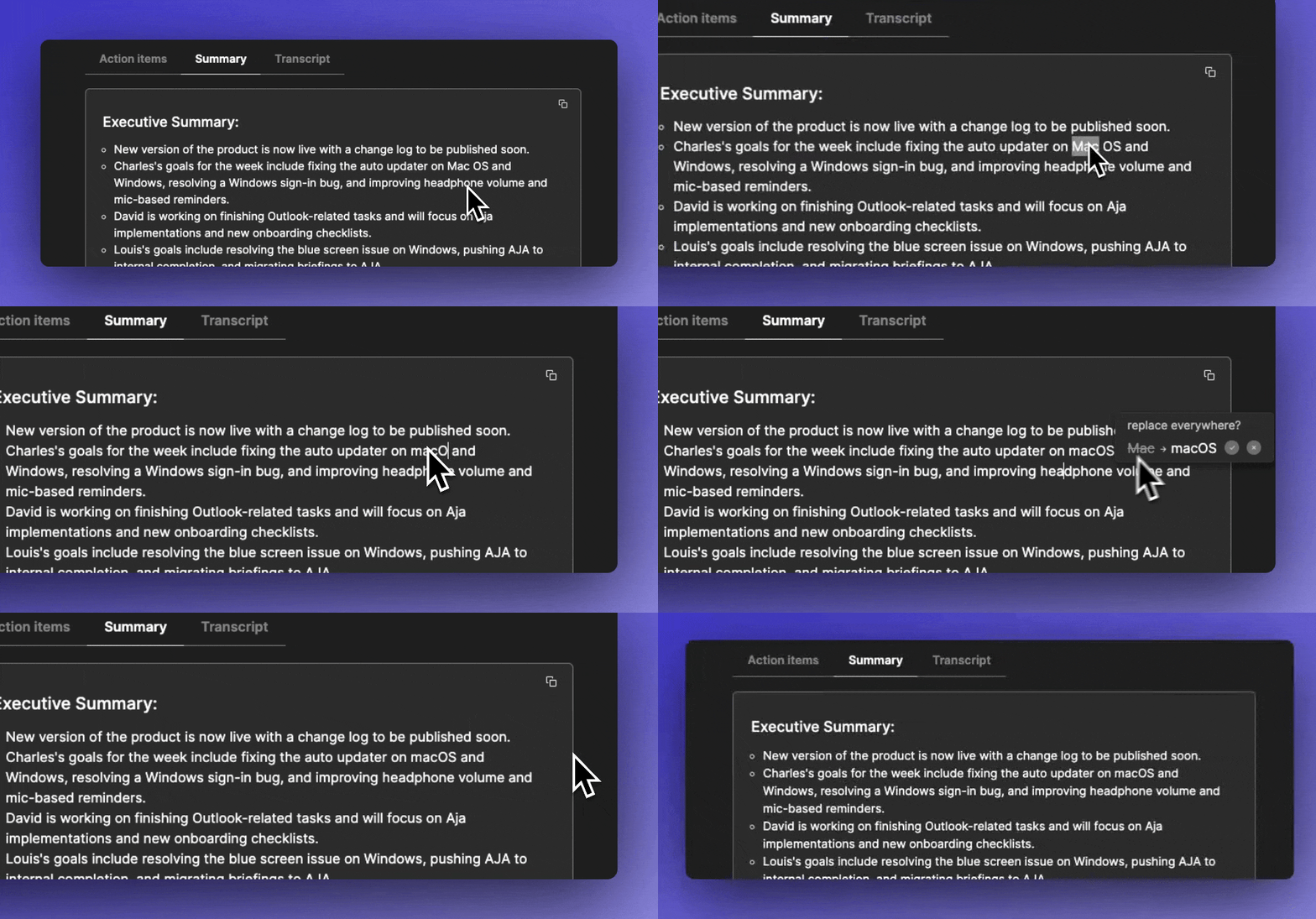
🔍 Easily fix typos with find & replace
Sometimes jamie misunderstands acronyms or unique names that you use in your life. Fixing those have been annoying, but fear no more. When you fix a word, jamie allows you to replace it everywhere in a summary with one click.
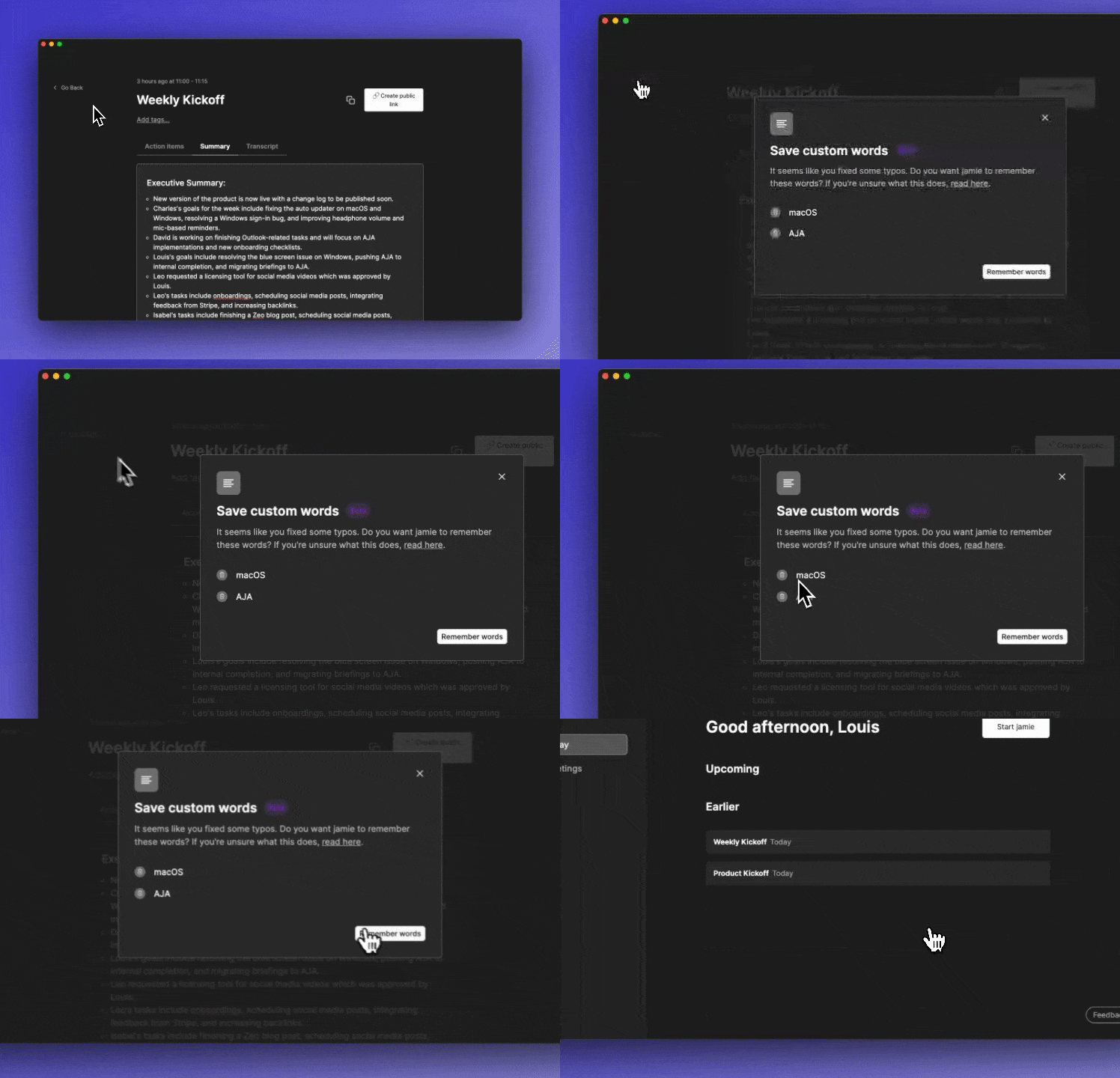
🗣️ Teach jamie custom words (beta)
Acronyms and names are hard to be picked up correctly by jamie. We added a way for you to add custom words which helps jamie to get them right in the transcriptions and summaries. It works great in some cases already but we are working on improving this even more during the next months.
💰 Introducing easy company billing
To have jamie for yourself is cool, but remember sharing is caring. After many requests, we finally shipped company billing allowing you to set up an admin that can manage the plans of the entire organisation. If you want to use this, schedule a call with our team so we can get you up and running.
💎 Improvements
Ensured co-pilot is preloaded before showing
🐞 Fixes
Adjusted audio recorder to avoid non-retriggerable summaries
Minor visual fix in custom notes
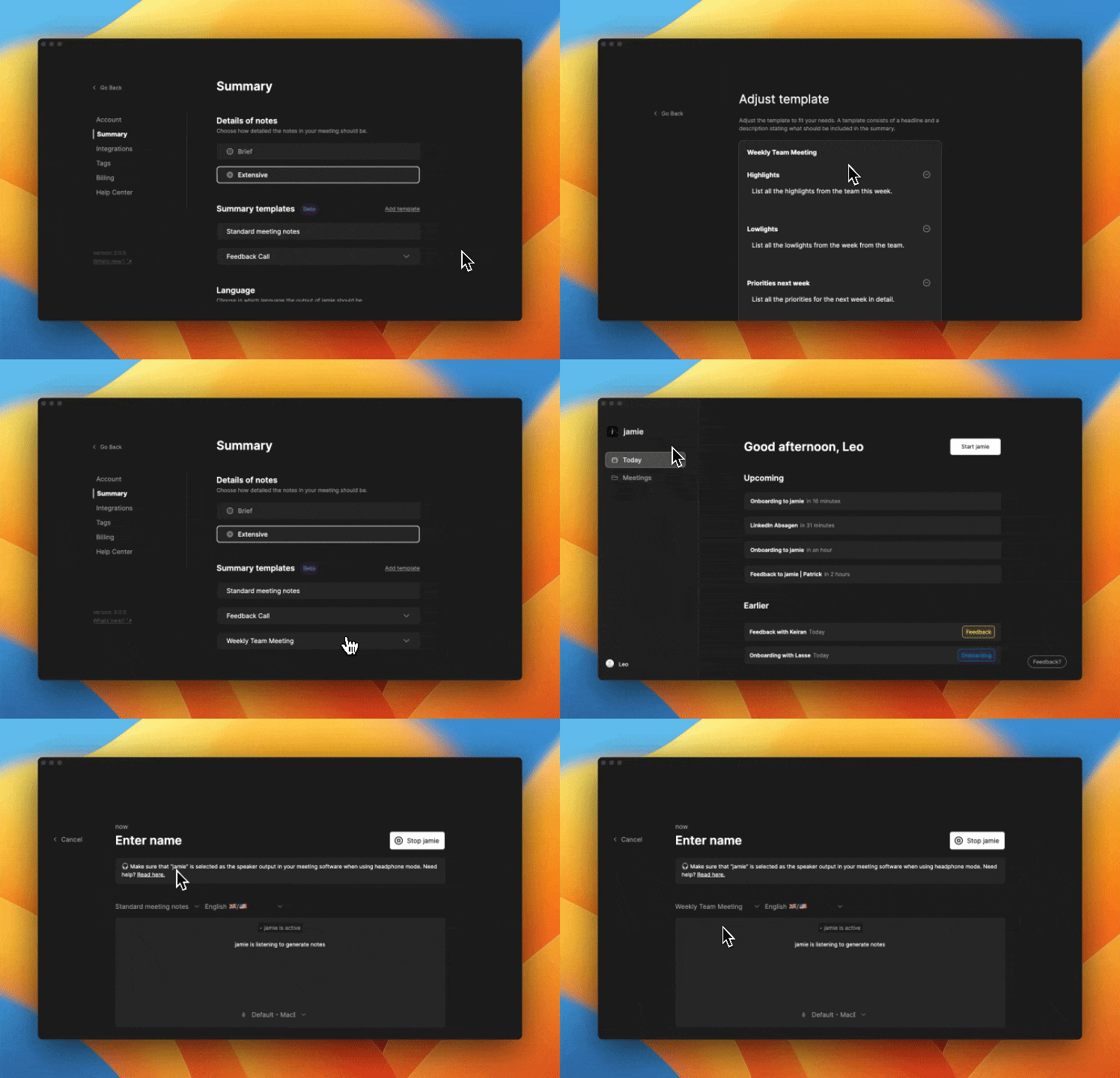
Topic-sorted notes are great. But sometimes, you need a specific structure for your notes. That’s why jamie now allows you to define custom note templates for meetings. A note template exists of multiple sections. You can tell jamie what to include in those sections based on a headline and description. Then, when summarising a meeting, you can select a template and after a meeting jamie will fill that template out for you. This is useful for recurring meetings like team kickoffs, check-ins, or interviews.
💎 Improvements
Adjust co-pilot window to always show on top
Added a plan overview to billing settings and made upgrading easier
🐞 Fixes
On windows, login information is retained without the need to log in again
Auto-update has been made more reliable
Refactoring of the audio recorder logic in the client to reduce stuck summaries
Removed swift installation prompt on macOS

How can we best assist you in your day without distracting you too much? The answer is our new co-pilot interface 👀. You can enable this new interface in your account settings. It is not intrusive, yet always there for you when you need it. Adjust mic input, select custom note templates, or finish a meeting with one click. Drag & drop it like there’s no tomorrow - the position is saved 🧭. We are looking for feedback to perfect this neat and helpful interface over the coming weeks.
🎧 Improved Headphone Mode on macOS (beta)
One of the biggest frustrations that our customers on macOS were still experiencing was the difficult to use headphone mode. Luckily, this struggle should come to an end very soon. jamie now automatically detects whether you are using headphones and adjusts the required system settings if needed. Once you stop jamie, everything goes back to normal. You also are reminded to adjust the output device in the meeting software you are using. Usually, this should always happen automatically. But just in case you need to jump in, you are reminded to do so.
💎 Improvements
Added option to select language of transcriptions for better accuracy
Improved speed of loading calendar events on cold-opens of application
Added back button to identification screen
Faster loading of calendar events in todays view
Remember last choice of meeting language in summarizing view
Added exec summary option to custom notes templates
🐞 Fixes
Fixed issue resulting in some summary outputs being German instead of English
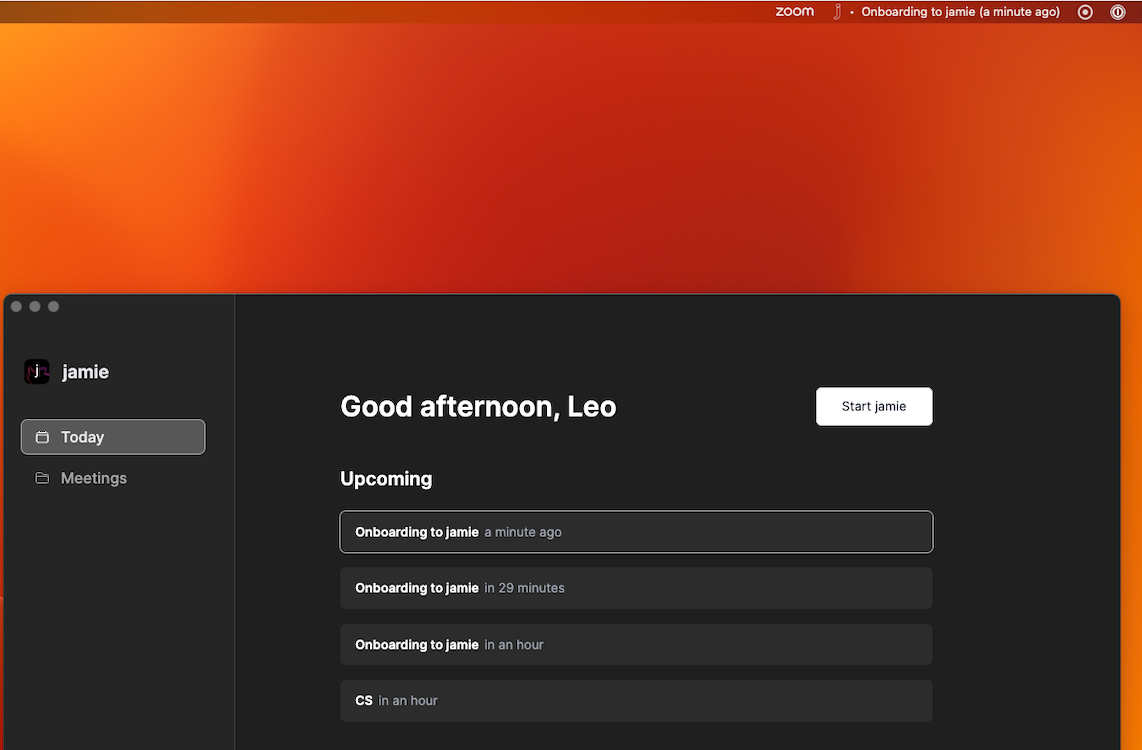
On macOS you can now see your upcoming events in your tray bar.
💎 Improvements
Search is saved after closing and reopening search function
Added a way to re-authenticate with Google in case scopes are missing
Close search bar on ESC
Made decisions interactive
Added formatting to copy-paste buttons
🐞 Fixes
Fixed refresh of calendar on detail view
Removed repeat onboarding trigger
Fixed problem where summaries got stuck in long monologues
Resized jamie icon
Added backup mechanism to avoid missing transcriptions
Fixed auto-start on initial installation
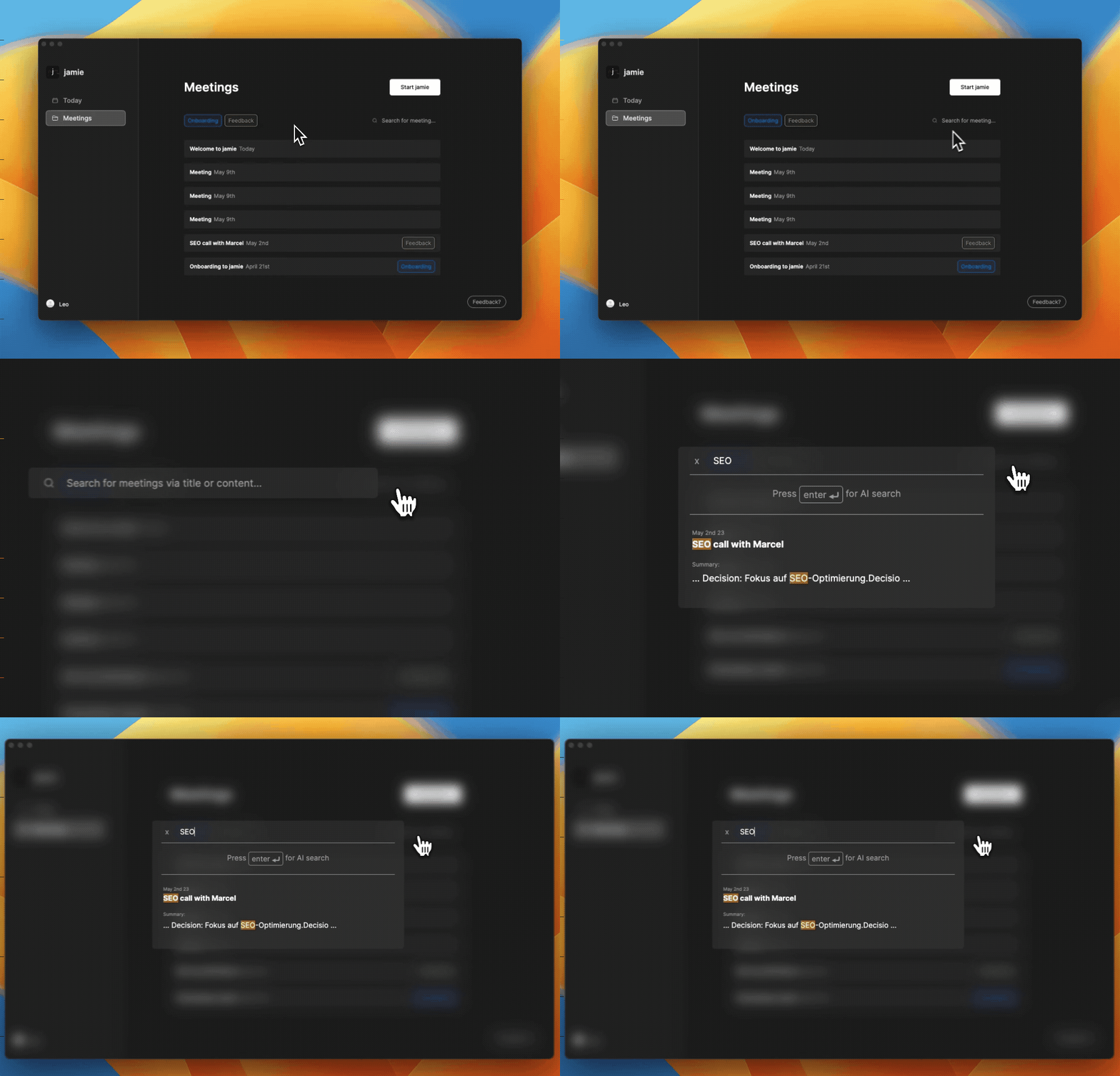
Were you ever looking for specific information of a meeting you had? Us as well. Now, you can search for any keywords across all your meetings inside of jamie easily. It will search through all titles, transcripts, and notes you summarised with jamie. Special shout out to David 🥳.
📋 Copy & Paste
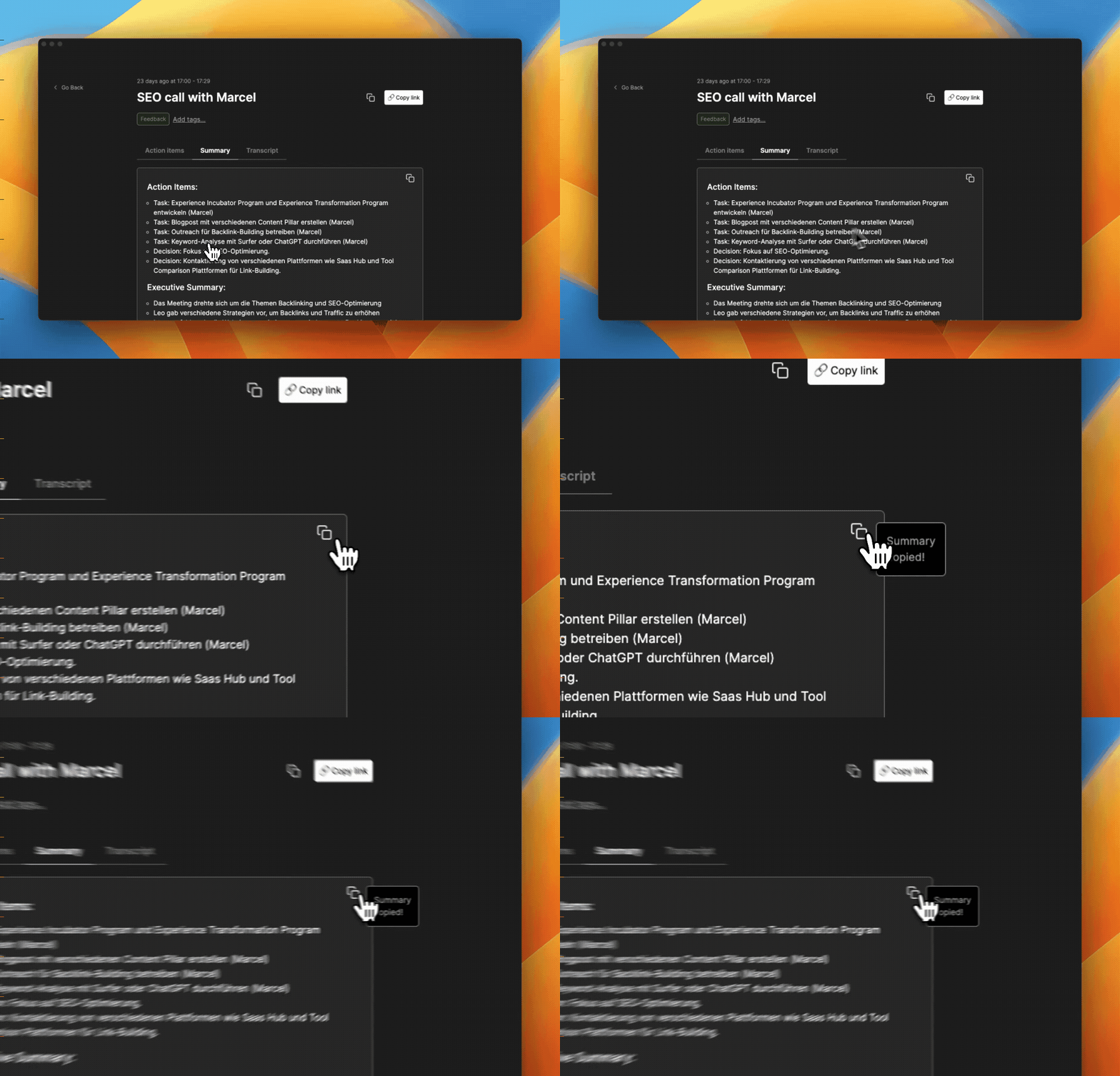
Getting information out of jamie and into other tools you already hard is tremendously important. This is why you can now copy-and-paste single parts of a meeting like the summary, tasks, or decisions. Also, you can copy-and-paste everything at once with a click of a button.
💎 Improvements
Added smiley-based summary rating
Some minor UI improvements
Improvements to auto-updater to allow for one-click updates
Improved windows installer
Added help center links to settings & feedback box
Automatically focus search bar when looking through meetings
🐞 Fixes
Fixed billing bug that created multiple subscriptions when trialing accounts
Added several retry mechanisms to increase the speed of summaries
Replacement of names in the action items section
Wait for driver installation on Mac for headphone mode
💎 Improvements
Adjusted the windows installer animation for jamie
Improved stability of summary flow yielding faster summaries in re-trigger cases
Improved language detection reliability
Increased level of details in extensive summary mode
Action items are now editable with one click
🐞 Fixes
Avoided pre-ready opening of application in windows installer flow
Fixed problem where minutes >60 minutes didn't show summary output
Auto-update summary detail view when notes in progress
💅 Facelift for jamie
After starting off by providing great summaries for our users, jamie will soon be able to automate many more tasks that you don’t enjoy doing next to note-taking. To successfully expand on this, it was time for a deep overhaul of the UI and performance of jamie which we are excited to now finally share with all of our users. You will notice that jamie feels significantly faster, works more robustly, and expand beyond a simple tool towards a powerful place for where you get work done quickly. Also, you have a brand new “Today” view, as well as a “Meetings” view to help you find what you are looking for faster. Keep an eye out for many small, yet helpful features that are coming to jamie over the next few weeks.
🗂️ Tags for structure
In your job, you will have many different areas and projects. That’s why you can now define tags in your settings and quickly filter based on tags in the meetings view.
💎 Improvements
Improved the onboarding experience and setup steps to get you up to speed with jamie quicker
Adjusted notes and executive summary to include more specific numbers and facts from meetings
Added heading & bullet point support to link sharing
Added offline-first support for meeting data to increase the speed of navigating the application
Added authenticated billing portal links to remove step of requiring pin codes
🐞 Fixes
Removed automatic headphone detection to avoid headphone mode switch when using external speakers
Improved stability of audio capture across systems to increase robustness of summaries
Fixed re-authentication bug when no internet connection was present on startup
Special shoutout to David and Charles for making jamie 3 come alive so quickly. Also, we would like to thank Saamia, Damian, Julius, Jamie, Firat, Dray, and Nils for their feedback in developing this new version.
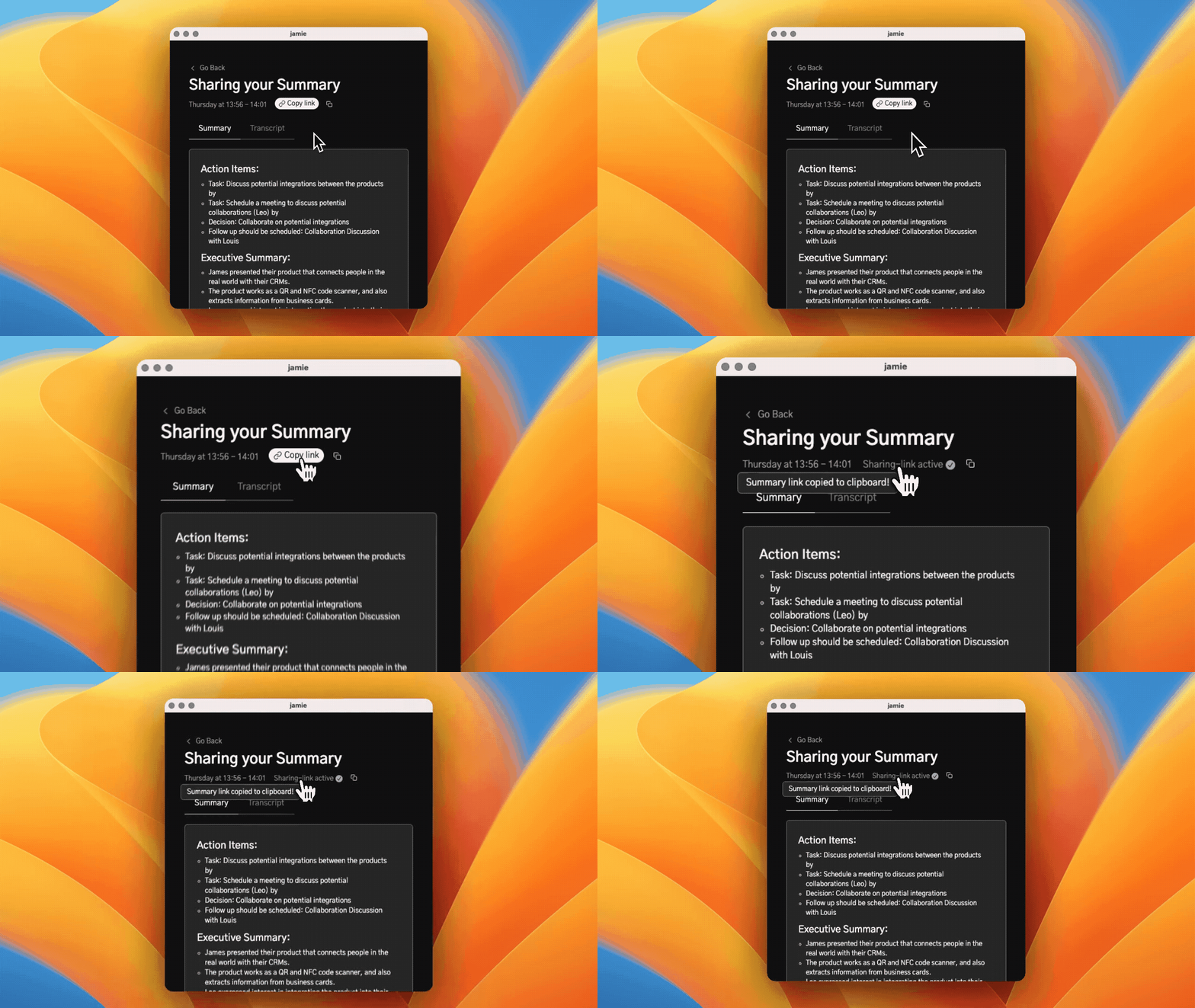
An important part of getting value out of meeting notes is sharing them with your team and colleagues. That's why we added a one-click link sharing feature to jamie. When you click "Copy link" when viewing a summary, we generate a safe URL and copy it to your clipboard. Then, you can share this link with anyone who should have access to the notes jamie generated for you. It is of course possible to always disable a link if you want to not share the notes any longer.
💎 Improvements
Improved name recognition & replacement in the summary
When switching the audio setup in jamie, the audio is no longer lost
Made "start jamie" button snappier
Not stopping meeting right away when computer goes to sleep (after 60s)
Increased validity duration of pincodes
Improved tray bar menu to show upcoming calendar events more reliably
🐞 Fixes
Removed "undefined" output in action items
Improved headphone mode on mac to be more stable
Fixed google calendar integration
🤑 Introducing Free Plan
After hearing from many of our beta testers that a free trial of 1 week might not be enough to be convinced of jamie, we are excited to bring a free plan to jamie. The free plan includes up to 5 meetings per month with a limit of 30 minutes per meeting.
🐞 Fixes
Made the "start jamie" action faster to avoid duplicate starts
We have improved the extraction capabilities of jamie to detect immediate tasks and decisions more accurately from meetings. This means that the action item output will be more useful to our customers.
Sometimes you want to go back to the exact moments of a meeting to get down to the details, we understand. That's why you can now view the transcripts of your meetings right inside jamie. You still get the summaries you love while getting the chance to review specific details. Kinda like the best of both worlds.
🎧 Headphone Mode for macOS (beta)
You asked for it, we (finally) built it. After weeks of trying to get headphone mode on mac to work (which was harder than we anticipated), we are delighted to announce that an implementation is now live in the product. As there are still some edge cases where headphone mode on macOS does not work as expected, we released this in beta for now. If there is anything you notice, please drop us a message any time.
🧠 Speaker Memory
We are excited to finally ship speaker memory to jamie. This means that jamie will automatically remember the names of the people you identified in earlier meetings and automatically pre-fills their names. Hopefully this saves you some time here and there ⏱️.
☑️ Summary Output Selection
The output you want to get out of a meeting can vary significantly from meeting to meeting. This is why we added a selection screen to so you can quickly decide whether you want notes, executive summary, or action items. jamie automatically remembers your preferences for the next time you are in a meeting. Action items are in beta for now as we are looking for ways to improve the accuracy of the extraction.
💎 Improvements
Auto update now works without annoying notifications and is more stable
Speaker diarization improved so it is more accurate and decreased the likelihood of mixed voices in audio clips for identification
Added brief/extensive modes for the summary
Added a new onboarding flow to make it easier to get started with jamie
Added a visualisation to check the quality of your audio signal to avoid cases of poor summary quality caused by poor audio signal
Changed jamie application window to work as a standalone window on mac instead of the tray-bar window
🐞 Fixes
Fixed Google Calendar/Outlook Calendar Integration to more robustly send notifcations
Fixed many edge cases causing summary failures for users yielding more robust results
Increased the overall stability of the application
🗣 Better Summaries With Speaker Diarization
Despite jamie already providing impressive summaries in some scenarios, we often got the feedback from our users that the quality of summaries could be improved. Hence, we started to work on ways to improve the quality of summaries. One of the core elements we believe will have a tremendous impact on the quality of summaries is identifying who is saying what. With this release, we are excited to ship the first implementation of speaker diarization. This allows us to detect different speakers in a meeting based on their voice. This way, the transcripts we use for the generation of summaries are much more structured.
🎧 Introducing Headphone Mode
We all know that most of us are using headphones while being in calls. That's why we are excited to ship headphone mode to jamie with this release. This allows jamie to capture the system audio output together with the microphone. This way, you can finally start using jamie even if you are using headphones. We start off by shipping this to Windows and will add it to macOS soon.
💎 Improvements
UI improvements for countless screens within the application
Improved the UI of the feedback box
Improved click behaviour of summary rating
Added setting for target language of summary (automatic translation)
Integration of Google Calendar
🐞 Fixes
jamie now automatically stops the recording when you put your computer to sleep
jamie remembers your authentication between starts
jamie auto start on system start up now works more reliably across operating systems