![Top 10 Bot-Free Notetakers for Microsoft Teams [2026]](/api/media/payload/Top_10_Bot-Free_Notetakers_for_Microsoft_Teams_2025-lgoyys.png)
I compared 10 bot-free notetakers for Microsoft Teams: Jamie, Microsoft Teams Copilot (Facilitator), Granola, Krisp, Circleback, Vomo AI, Meetily, ChatGPT Record Mode, Tactiq and Bluedot. I ranked them on accuracy, productivity, value for money and security under GDPR.
We ran our own accuracy test on Jamie against four other AI note takers. Jamie scored 90 for transcription, 90 for AI summary, and 98 for speaker identification, which ranked Jamie number one of the five, ahead of Otter, Fireflies, Granola, and Fathom.
Whether a bot has already dropped into your Microsoft Teams meeting, or you are only now choosing a tool, the question stays the same: what is the best bot-free notetaker for Microsoft Teams? In this article, we are going to show you 10 of them.
What Are the Best Bot-Free Notetakers for Microsoft Teams?
The 10 best bot-free notetakers for Microsoft Teams are Jamie, Microsoft Teams Copilot (Facilitator), Granola, Krisp, Circleback, Vomo AI, Meetily, ChatGPT Record Mode, Tactiq, and Bluedot.
Each of these tools generates meeting notes from your Microsoft Teams calls without a bot on the participant list, and Circleback does this through its desktop app.
Jamie is a bot-free AI note taker that is also GDPR compliant and ISO 27001 certified. Jamie is DORA-ready and stores and processes all meeting data in Europe on every plan, including the free one.
Once Jamie generates the transcript, Jamie proceeds to delete your meeting audio. Jamie never uses your meeting content to train AI models. Circleback is SOC 2 Type II certified and HIPAA compliant. When paired with local Whisper transcription and a local Ollama model, Meetily operates entirely offline.
Below is a breakdown of the 10 bot-free notetakers for Microsoft Teams that I researched: Jamie, Microsoft Teams Copilot (Facilitator), Granola, Krisp, Circleback, Vomo AI, Meetily, ChatGPT Record Mode, Tactiq, and Bluedot. Click any cell to expand it.
1. Jamie - Bot Free Notetaker for Microsoft Teams With Executive Level AI Notes in Under 30 Seconds
Best for: Compliance-driven teams that need a bot-free AI note taker for Microsoft Teams, with all meeting data stored and processed in Europe, GDPR compliant and ISO 27001 certified, DORA-ready, plus in-person meeting recording.
Similar To: Granola, Krisp, Bluedot
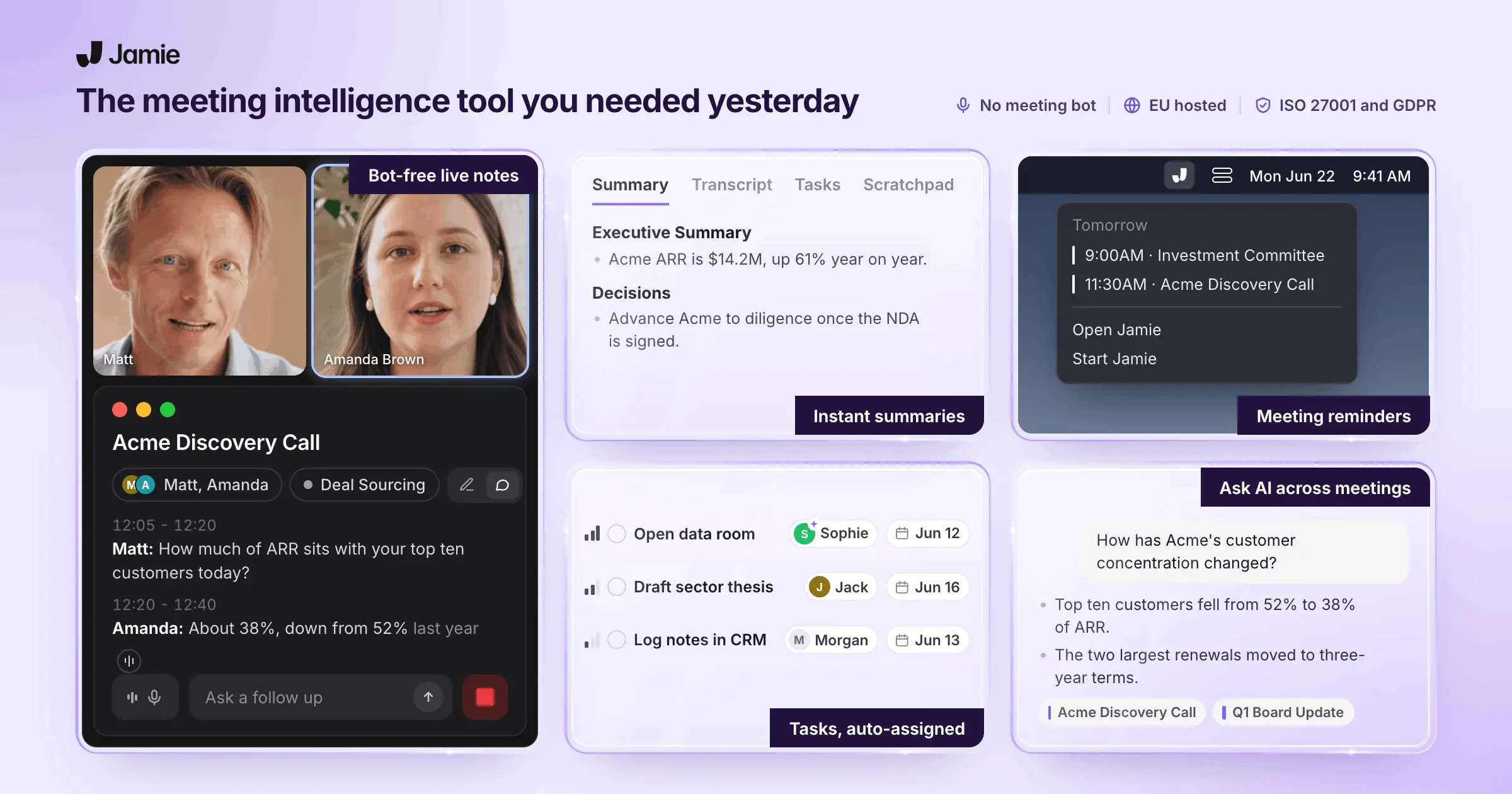
Jamie is a bot-free AI note taker for Microsoft Teams that records through your own device.
Confidentiality is maintained by Jamie recording non-intrusively on your own device; therefore, all your private discussion remains private and encrypted.
If your team has multiple consecutive client calls, these are the main features of Jamie that you will be using or would benefit on/for your daily workflow.
Bot-free capture: Jamie records your Microsoft Teams, Zoom, Google Meet and in-person meetings from your own device, so no bot joins the call.
Executive Level AI Notes: Jamie generates the notes, transcript and action items in under 30 seconds, so the write-up is done before your next call.
All meeting data in Europe: Jamie stores and processes all meeting data in Europe, on every plan including our free plan.
GDPR, ISO 27001 and DORA: Jamie is GDPR compliant, ISO 27001 certified and DORA-ready, so your compliance officer reads one page and signs.
Conversational Intelligence: Jamie answers questions across every meeting through Ask AI, on every plan including our free plan.
Agentic Intelligence: Jamie runs an agent through Connectors you authorize with your own account, so a Notion page or an Attio record updates itself.
Plug and Play Integrations: Jamie logs your notes to HubSpot, Salesforce, Attio, Pipedrive, Dynamics 365, Notion, Google Docs and Asana on Pro and up, plus webhooks, API and MCP.
If you are a team recording confidential discussions with clients, portfolio companies and LPs, you know they ask for the following five confidentiality answers, and Jamie answers all five:
No Bot in Their Call: Nothing appears in their attendee list, so nobody stops the meeting to ask who just joined. When gathering consent (which is utmost important) You can tell them yourself verbally) or you can opt for Jamie's consent email, a recording notice before the call, 4 hours ahead by default.
No Admit Prompt for Their Host: Normally with other AI note takers, a bot waits in the lobby until the host clicks Admit. Which causes unnecessary and added work and intrusion, Jamie never asks for entry or cause risk alarms.
No Bot for Their IT to Block: Many companies block note taker bots from their Microsoft Teams calls, so a bot tool leaves you with nothing. Jamie records on your laptop.
No Platform Left Out: Jamie records the audio on your own device, so the platform does not matter. Mac, Windows, iPhone, Android, and every meeting app that runs on them.
No Audio Kept After the Transcript: Jamie deletes your meeting audio once the transcript is generated, and neither Jamie nor our model providers train on it.
The eight sections listed below will show you in detail how each feature would become a solution to your problem.
Jamie records Microsoft Teams, Zoom and Google Meet calls with no bot in the attendee list
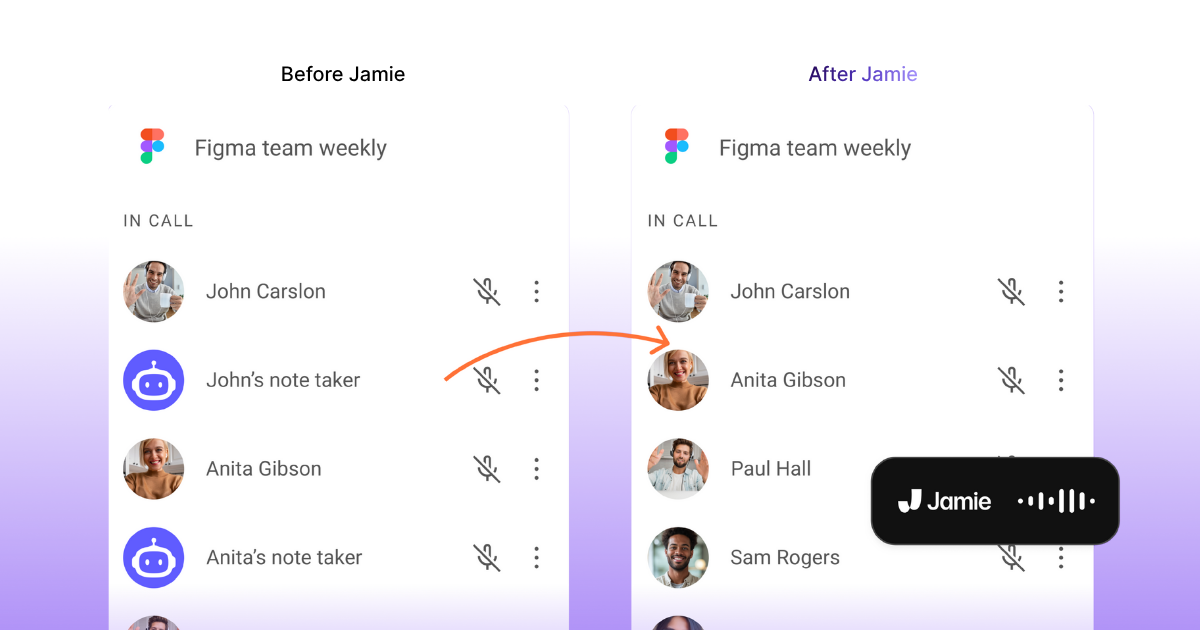
Jamie records your Microsoft Teams, Zoom and Google Meet calls through your own device. Therefore, no bot shows up in the attendee list. We built the recorder to run on your own machine, so nothing requests entry and nothing appears as an anonymous guest that feels so intrusive and unwelcomed. When your meetings are with clients, founders and portfolio companies, these six capture features keep the conversation private, natural, automated and gives it a touch of human:
Native desktop app: Jamie records from your own machine and never joins as a participant, so there is no bot for your Microsoft Teams admin to admit or block, and the disclosure comes from you instead.
Auto-start recording: Jamie starts as soon as your Microsoft Teams call begins, so a back-to-back day never costs you the first ten minutes of a call.
Auto-stop recording: Jamie stops when your Microsoft Teams call ends, so the internal chat you have straight afterwards never reaches the transcript.
Floating recorder: A small draggable recorder sits beside your Microsoft Teams window, so you can see it is running while you present.
Scratchpad: Type your own private notes during the Microsoft Teams call, and they stay out of the summary you send the client.
In-person meeting capture: Record the management presentation in person on your phone, and get the same notes you get from a Microsoft Teams call.
Jamie gathers consent from your attendees by email and in the Microsoft Teams chat, with no bot to approve
Jamie discloses recording in two ways. First, a recording notice email goes to your attendees before the meeting. Second, a compliance notice is posted in the Microsoft Teams chat once recording starts. We built consent in because Microsoft is now restricting undisclosed bots in Teams: the ExternalBotAccessMode policy sends detected external bots to the lobby by default, and from August 2026 an admin can block them outright, with legal, finance and executive teams the groups put behind that hard block. Jamie never joins your call as a participant, so the people on the call hear the disclosure from you or read it from Jamie, never from a stranger in the attendee list. If your compliance team needs to review how attendees were told, these three consent notices are the ones they sign off:
Recording notice email: Jamie emails your attendees before the meeting, 4 hours ahead by default and anywhere from 10 minutes to 48 hours, so consent is settled before anyone dials in, and your own colleagues are left off the list.
Meeting chat notice: Jamie posts a one-line notice in the Microsoft Teams chat once recording starts, so the disclosure sits in the meeting record itself. It is in beta and stays off until you switch it on.
Your own words: Say out loud that Jamie is taking notes, and that stays the first and best notice, because our own docs put informing participants with you rather than with a silent default.
Jamie is GDPR compliant and ISO 27001 certified, and stores all meeting data in Europe
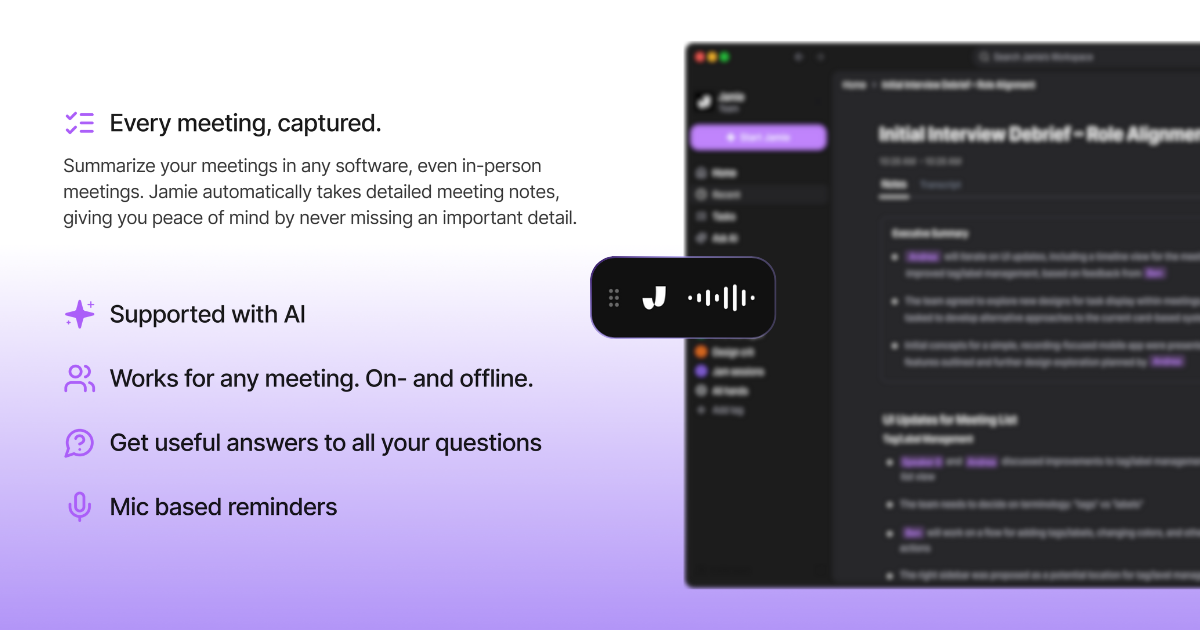
Jamie is GDPR compliant, ISO 27001 certified, stores all meeting data in Europe, and is DORA-ready. We hold ISO 27001 at company level, not through a hosting provider's certificate, and an outside auditor performs our audits. If a security or legal team needs to approve Jamie, here are the nine compliance answers they ask for:
GDPR compliant and hosted in Europe: All meeting data is stored and processed in Europe, on every plan including our free plan, so a European client never has to ask where the recording of their call ended up.
ISO 27001 certified and DORA-ready: Jamie is GDPR compliant and independently audited to ISO 27001, so a bank or fund under DORA can approve Jamie without a special exception.
AES 256 encryption: Jamie encrypts your data with AES 256 at rest and TLS 1.2 in transit, so the encryption line on your IT questionnaire is already answered.
Permanent audio deletion: Jamie deletes your meeting audio once the transcription is finished, so no recording of a Microsoft Teams call is left for anyone to request later.
No model training on your data: Jamie never trains models on your meetings, and neither do our model providers, so a client's numbers stay inside your own account.
German company, European infrastructure: Jamie is built and run under EU data protection law with regular external audits, so your legal review starts with a German company rather than an unfamiliar one.
SAML SSO and SCIM: Enterprise connects Okta or Azure AD through SAML 2.0 with automatic user provisioning, so a leaver loses access the same day IT removes them.
Audit logs and data retention: Enterprise includes audit logs, custom data retention rules and granular access controls, so you can show who opened which meeting and when.
DPAs and IP allowlist: Enterprise includes data processing agreements and an IP allowlist, so logins to your workspace only happen from your own network.
Jamie generates Executive Level AI Notes with speaker names and action items in under 30 seconds
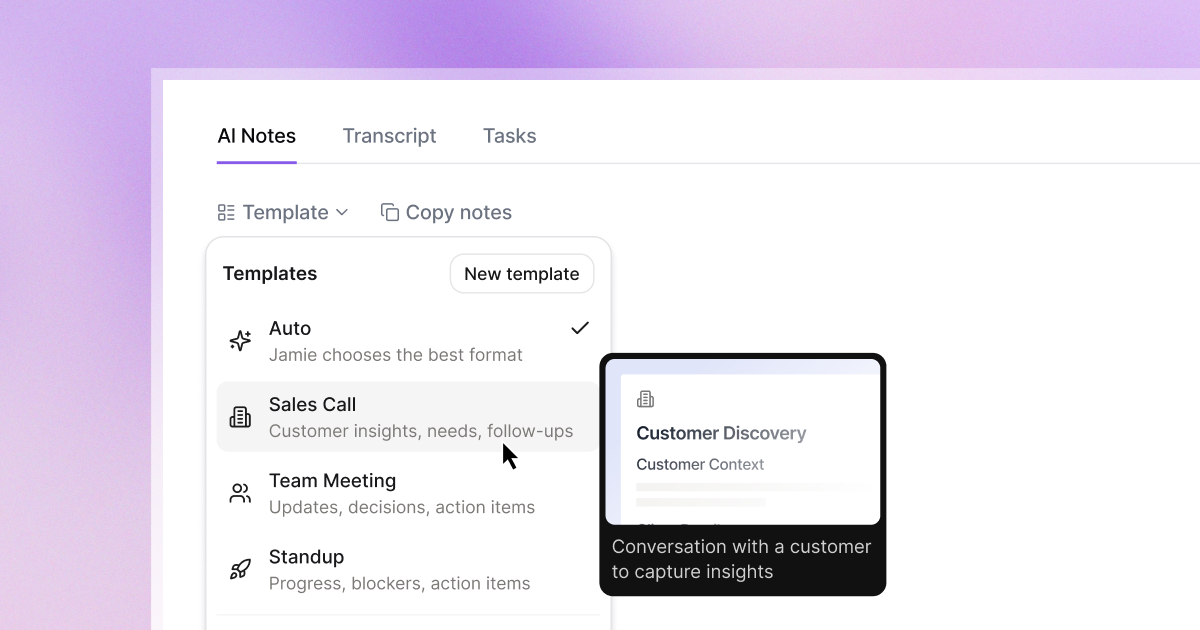
Jamie generates Executive Level AI Notes, along with the full transcript and the action items, in under 30 seconds after you stop recording. We format the output around the type of meeting you had, so an auto-applied template formats the notes while Speaker Memory puts the real names on every line. If you send notes to a client or an investment committee the same hour, these nine note features make them ready to share:
Executive Level AI Notes: Jamie generates an executive summary, topic-sorted notes and the full transcript in under 30 seconds, so you can send the recap before your next Microsoft Teams call starts.
Action items with assignees: Jamie extracts tasks with names, checkboxes and a link back to the moment they were agreed, so nobody argues later about who owned what.
Custom templates: Jamie ships 30+ pre-built templates on every plan, plus 1 custom template on Free, 3 on Plus and unlimited from Pro, so a sourcing call and a board meeting never come back in the same shape.
Auto-apply templates: Jamie classifies each meeting and applies the best matching template from the content and the calendar title, so you never pick a format at 6pm.
Speaker Memory: Jamie has the ability to remember voices between meetings, so a hybrid Microsoft Teams call comes back with real names instead of Speaker 1 and Speaker 2.
Custom vocabulary: Teach Jamie your portfolio company names and deal jargon, 50 terms on Free, Plus and Pro, 100 on Team and 250 on Enterprise, so they are spelled right the first time.
100+ languages: Jamie transcribes and summarises in more than 100 languages with automatic language detection, so a call that runs half in German comes back readable.
Editable notes: Click anywhere in your summary to correct text, change formatting or add headings, so one wrong figure never travels on to the client.
Live Transcript: Jamie transcribes your Microsoft Teams call in real time while people are still speaking, so you can check a number without interrupting anyone.
Jamie answers questions across every meeting through Ask AI, on every plan including our free plan
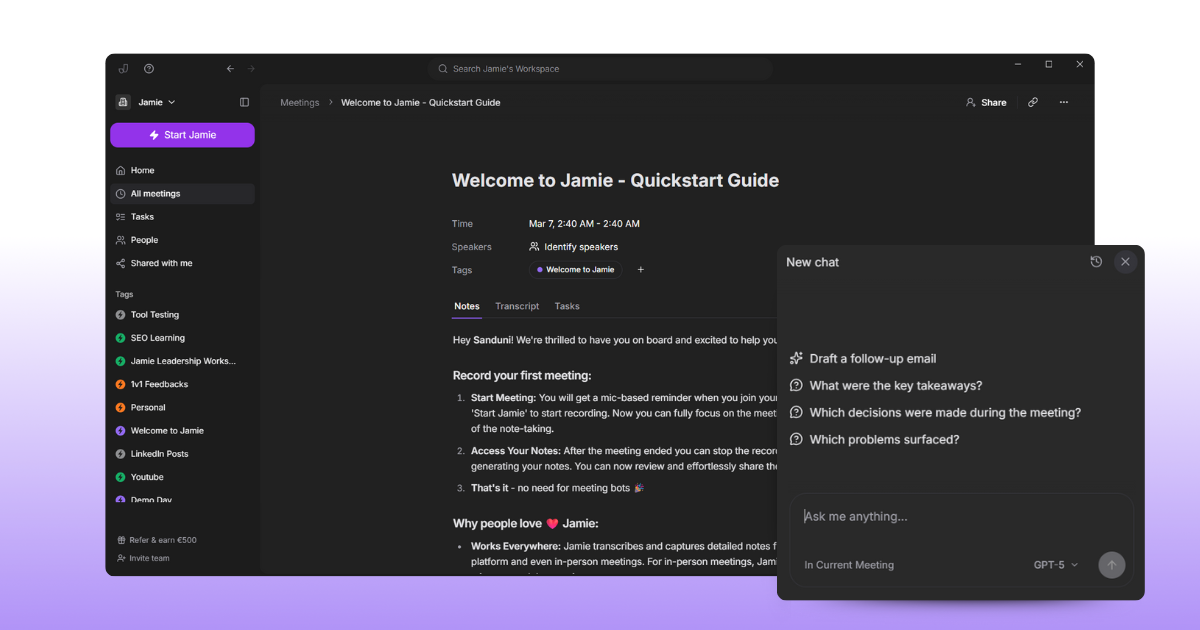
Jamie answers any question you ask about your meetings through Ask AI, on every plan including our free plan. We do not charge you per question, so you can ask about one meeting, a single tag or your whole history without spending a credit. If you need a number or a decision from a call three months ago, these five search features retrieve it:
Ask AI on a single meeting: Query one meeting's summary and transcript in plain language, so you can pull the one commitment you need without rereading the call.
Cross-meeting search: Ask AI searches every meeting at once and shows which recordings informed each answer, so you can trace an answer back to the call it came from.
Tag-based queries: Group meetings by deal or client, then use Ask AI inside that tag only, so one company's history never bleeds into another's.
Draft follow-ups and emails: Generate a scoping email, a follow-up or a Slack update straight from the meeting content, so the follow-up leaves before you close your laptop.
No message credits: Use the Ask AI feature as much as you want, including on our free plan, and we do not charge you per question, so nobody rations questions at month end.
Jamie is Built with Agentic Intelligence with Agent, Connectors, Skills and MCP across your tools
Jamie has Agentic Intelligence built in, so the agent the takes action in the tools you already use. We built Agent to work through Connectors, which you authorize once with your own account, so Jamie can create a Notion page, update an Attio record or post to Slack using only the access your account already has. If your week ends with the same follow-up chores after every client call, these four agentic features take that job off your desk:
Agent: Jamie takes action in your connected tools from a chat, so the work after a Microsoft Teams call happens without you opening five tabs.
Connectors: Jamie connects to Notion, Linear, Attio, GitHub, Slack and Gmail with your own account, so Jamie can only reach what you can already reach.
Skills: You write personal instructions once, and Jamie activates them during agent conversations, so your own follow-up routine runs the same way every time.
MCP: Jamie connects Claude, ChatGPT, Cursor, Windsurf and Microsoft Copilot to your notes on Pro, Team and Enterprise, so you can ask your own AI tool about last week's calls.
Jamie logs meeting notes to HubSpot, Salesforce, Attio, Notion and Asana
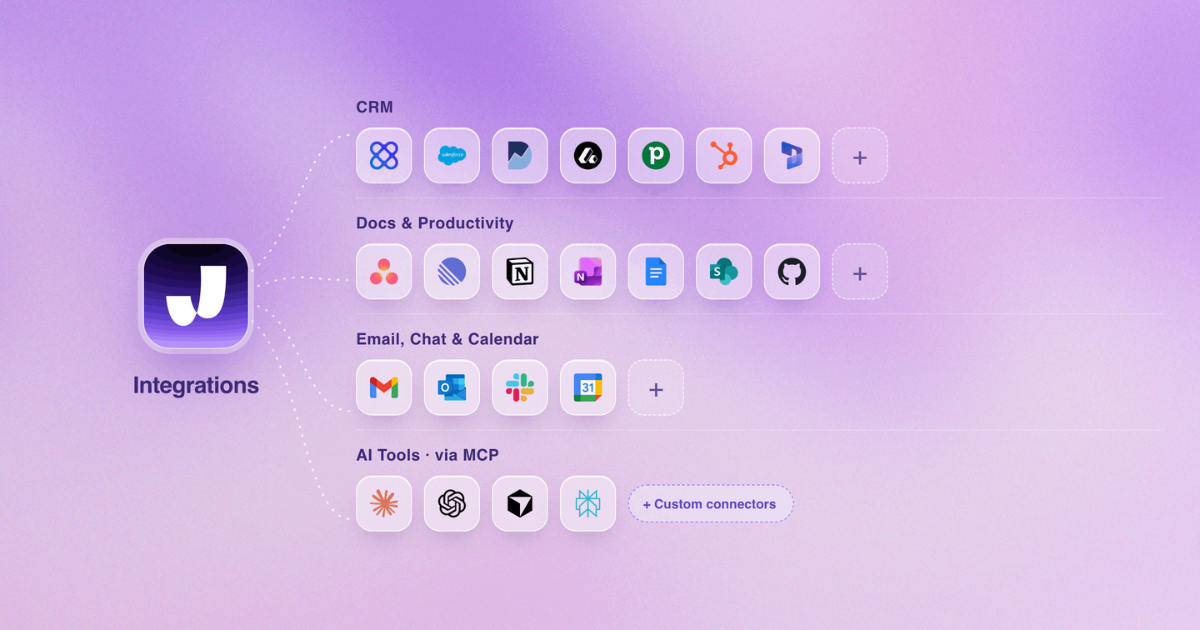
CJamie logs your summary, transcript and action items to HubSpot, Salesforce, Attio, Notion and Asana. Once you connect each tool in Settings, then Integrations, Jamie logs the notes to the record you select, or syncs every meeting automatically. If your deal team retypes notes into a CRM after every call, these eleven integrations are where the retyping stops:
HubSpot: Jamie logs your meeting notes to a contact, company or deal, in the Notes section of that record, on Pro and up, so the account history is current before you leave the call.
Salesforce: Jamie attaches your meeting notes to a Lead, Contact, Opportunity or Account as a Note, on Pro and up, so the next person on the account reads what actually happened.
Attio: Jamie sends your summary and transcript to a person or company record, on Pro and up, so your pipeline shows the last real conversation.
Notion: Turn on automatic sync and every meeting lands in a dedicated Notion database, so the deal page updates itself.
Google Docs and OneNote: Turn on automatic sync and Jamie creates a doc in Google Drive or a page in your OneNote notebook, so your Microsoft 365 team keeps notes where they already look.
Asana: Jamie sends your action items as tasks to a project with the notes attached as a PDF, on Pro and up, so the task list is built before the call ends.
Webhooks and API: Jamie posts your meeting data to 3 personal endpoints per user and 5 workspace endpoints, on Pro and up, so your own systems get the meeting without an export.
Make.com automation: Chain Slack, Notion and calendar actions off a finished meeting, so one Microsoft Teams call triggers the whole routine.
Dynamics 365 and Pipedrive: Jamie saves your meeting notes to Dynamics 365 Sales and Pipedrive records, on Pro and up, so your Dynamics record carries the call without anyone leaving Microsoft 365.
DealCloud and Affinity: Jamie logs your meeting notes to DealCloud on Team, and to Affinity on Enterprise, so a deal team keeps every interaction in the CRM they already run on.
Jamie records on macOS, Windows, iOS, Android and the web, with in-person meetings on every plan
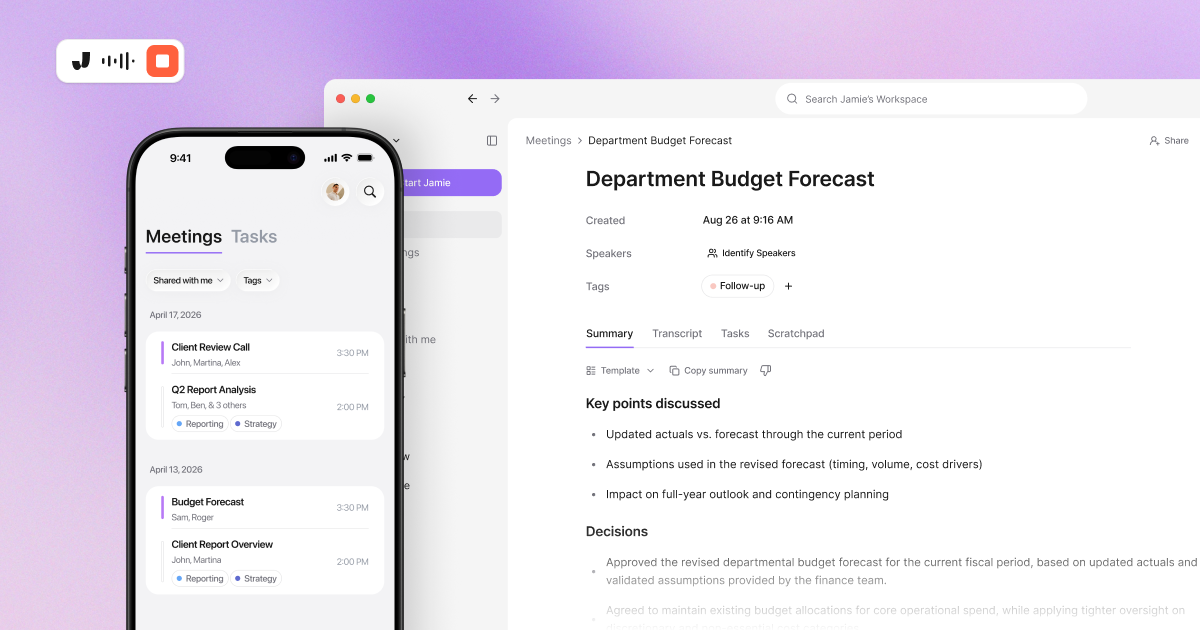
Jamie records meetings on macOS, Windows, iOS, Android and the web, and in-person meetings are included on every plan. Your meetings synchronise across every device from one account, so a recording made on your phone appears on your desktop. If your work week runs across the office, your home and a client's board room, these seven capture options cover all three:
macOS and Windows apps: Jamie records, edits, shares and applies templates on both desktops, so IT can roll Jamie out across a mixed fleet.
iOS mobile app: Record in-person meetings, read notes and use Ask AI from your phone, so the meeting you took in a client office sits beside your Microsoft Teams calls. Phone call recording is not supported on iOS.
Android app: Jamie records on Android with lock screen controls and a live recording widget, so you can stop a recording without unlocking your phone.
Web access: Read and share notes, transcripts and tasks in any browser, so a colleague without the app can still open the meeting.
Calendar sync: Google and Outlook calendars sync event names and participant lists, so meeting titles and speaker names are filled in for you.
Cross-device sync: Meetings recorded on any device appear on desktop, mobile and web, so the note you took in the taxi is on your laptop when you sit down.
Team workspaces: Share meeting notes selectively with teammates while your Scratchpad notes and personal templates stay private, so a shared deal tag never exposes your own thinking.
Jamie pricing
Free: €0 per month
Plus: €25 per month
Pro: €47 per month
Team: €39 per seat per month
Enterprise: Custom pricing
Annual billing saves 17%. Source: Jamie Pricing Page
What Jamie users love
No assistant to invite into the meeting
"I like that I can use Jamie without having to invite a weird assistant to the meeting, so nobody knows I'm using it. The quality of the transcripts and summaries is great" Alberto A., G2
Hosted in Europe and out of the way
"I like Jamie's security, especially since it's hosted in Europe where privacy priorities seem stronger than in the US. I appreciate that it's unobtrusive and doesn't distract from my work or interviews." a Verified User, G2
Meeting minutes stop taking your evening
"Saves me a lot of time in creating meeting minutes. I can also use Jamie as a brainstorming tool by having my spoken thoughts summarized. Works on the phone too." Wolfgang Z., G2
What Jamie users flag
The free plan stops at 30 minutes a meeting
"The 30min meeting limit, but I understand that's the business model ;)" Charlotte Z., G2.
The iPhone app does less than the desktop app
"That the iOS version isn't as optimised as the desktop version" a Verified User in Consulting, G2.
Speakers who join late need sorting out
"I find it not ideal that problems occur when spontaneously adding and assigning participants, for example, when uninvited people join a call." Oliver L., G2.
What Are Real-Life Users Saying About Jamie?
task accuracy


2. Microsoft Teams Copilot (Facilitator) - Real Time AI Notes Inside Microsoft Teams on a Microsoft 365 Copilot Licence
Best for: AI-powered meeting notes and summaries built directly within Teams without bots
Similar to: Jamie, Tactiq, and Bluedot.
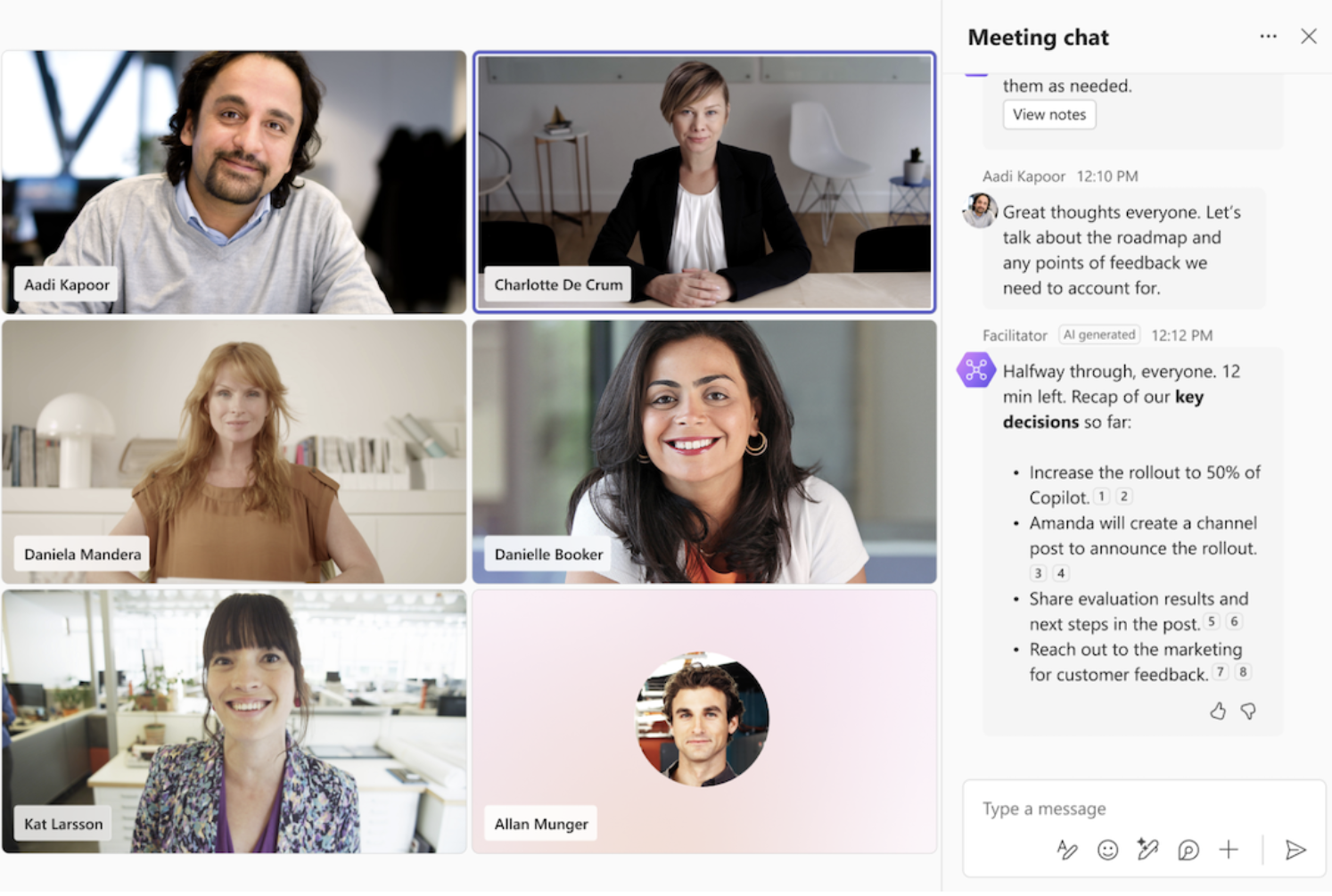
Microsoft’s Copilot Facilitator is designed to take notes inside Teams meetings without showing up as an extra participant. Once enabled, it transcribes the conversation, highlights key decisions and open questions, and writes AI-generated notes directly into the Meeting Notes pane. After the meeting, everything is saved in a collaborative Loop page so your team can edit and build on the notes together.
Who is it for?
Teams that want AI note-taking built natively into Microsoft Teams, with strong privacy handling and minimal setup.
Key features
Automatic transcription and AI-generated notes, including action items and open questions
Real-time summaries that appear in the Meeting Notes tab and stay accessible in the Recap afterward
Shared Loop pages where everyone can edit and add context post-meeting
Interactive prompts such as “@Facilitator, what open questions do we still have?” that all participants can see
Pricing
A Microsoft 365 Copilot licence is required to add Facilitator to a meeting or turn it on during a meeting, and Microsoft 365 Copilot costs $30.00 per user per month, paid yearly, on top of a qualifying Microsoft 365 plan
What Facilitator users love
Real-time notes everyone can co-author
"By generating real-time AI notes and suggesting tasks, it facilitates co-authoring and collaboration, ensuring that every participant is on the same page." GiulianoDeLuca, Microsoft MVP, Microsoft Community Hub
Colleagues can switch it on during the call
"I have attended meetings where coworkers have turned on a Facilitator feature that assists with meeting notes and transcription." a Microsoft Q&A user, Microsoft Q&A
What Facilitator users flag
Hard to find even with Copilot switched on
"But I can't find where this feature is hiding on my Outlook meeting invitations, or on the Teams console during the call." a Microsoft Q&A user, Microsoft Q&A
Unlocked in the admin centre but still missing
"I can see the app in teams admin and its all unlocked and available. I cannot seem to get it to appear on our org and in teams as a meeting option." Sammmios92, Microsoft Q&A
3. Granola - AI Notepad That Turns Your Own Rough Notes Into Structured Summaries
Best for: Turning your own rough notes into polished summaries
Similar to: Jamie, Circleback, and Bluedot.
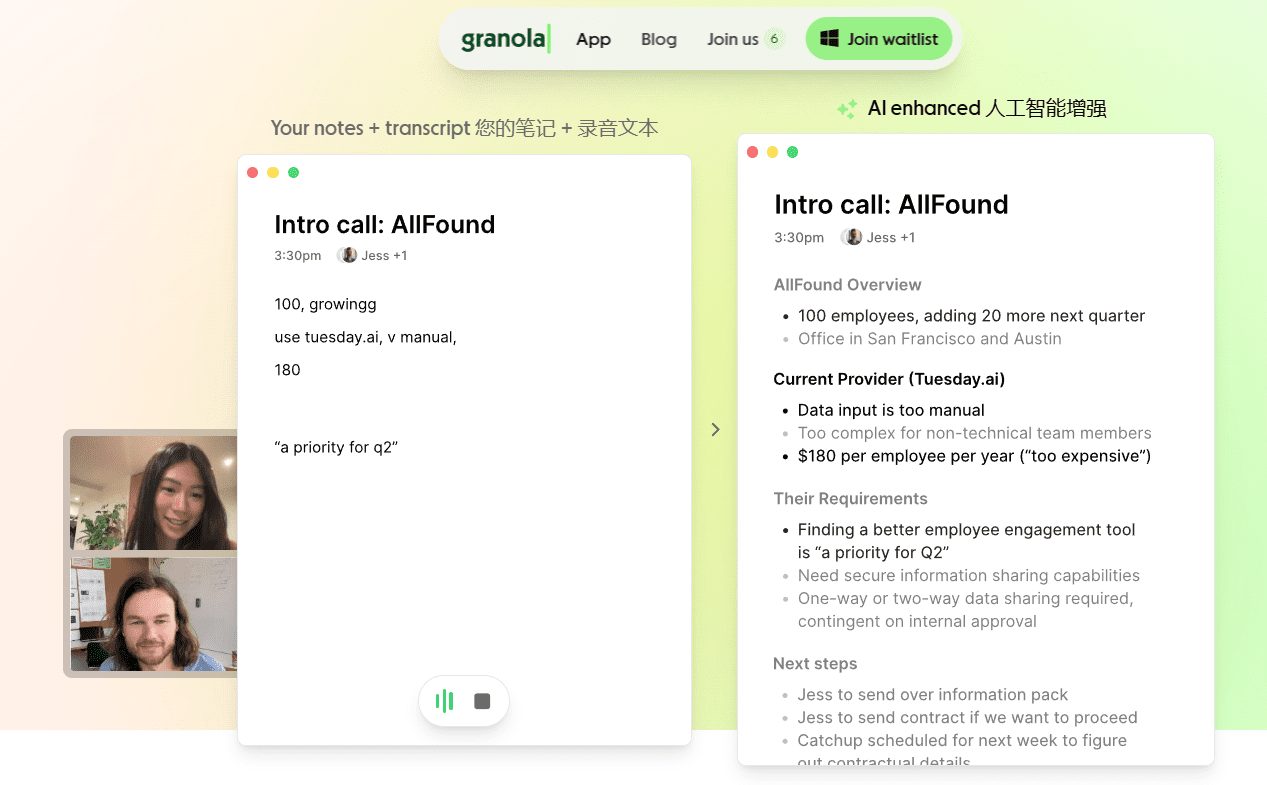
Granola acts like your personal AI notepad during Teams meetings. Instead of joining as a bot, it listens to your computer’s audio in the background. You can jot down a few quick notes or headers. After the meeting ends, Granola enhances them with rich structure, summaries, and action items based on the transcript.
Who is it for?
Professionals who prefer to stay present in conversations and manually note key points.
Key features
Uses customizable templates for various meeting types (e.g., interviews, standups, pitches) to structure notes effectively
Integrates with Slack on the free Basic plan, and with Attio, Notion, HubSpot, Affinity and Zapier on the Business plan
You can chat with your meeting notes and get instant AI-powered responses with context and citations
Pricing
Basic: $0 per user per month, with the last 30 days of meeting history
Business: $14 per user per month, with unlimited meeting notes and history
Enterprise: from $35 per user per month, with SSO and org wide admin controls
What Granola users love
Transcribes on Mac and on iPhone
"It transcribes both on my Mac and iPhone, which is a game-changer for on-the-go catch-ups." AD, G2
Pops up when a meeting starts
"I like that I have the Granola app, and if a meeting is starting, it recognizes that and pops up, so I never forget to click record." Anne C., G2
Chat across your own meeting history
"I like the most the chat function with Granola itself. I can go back in history without having to search for the chat." Lisa K., G2
What Granola users flag
No way to start the recording partway in
"I'd love the ability to create a note and only start recording when I'm ready." Shui H., G2
Speaker names get fixed by hand
"The accuracy of transcripts, specifically names, is something that needs work." Verified User, G2
Voices are not always told apart
"It also doesn't always distinguish between different voices, so it can be unclear who is speaking." Verified User, G2
Also read: Granola vs. Bluedot vs. Jamie: Which Meeting Tool Works Best for You?
4. Krisp - Bot Free Meeting Notes With Noise Cancellation and Accent Conversion Built In
Best for: Clear, bot-free meeting transcription in noisy environments
Similar to: Jamie, Granola, and Circleback.
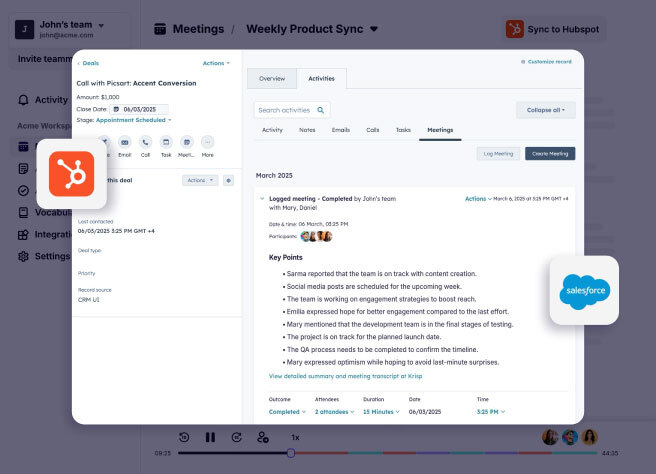
Krisp is best known for its noise-cancellation technology, but it also doubles as a bot-free note-taker for Teams. It captures live transcripts, creates AI-generated summaries, and pulls out action items without joining your meetings as a bot. The app runs directly on your device, so it filters out distractions while keeping your meeting flow intact.
Who is it for?
Sales teams, consultants, recruiters, and remote workers who need accurate notes and transcripts even when background noise or accents could otherwise interfere.
Key features
Real-time transcription across Teams and other meeting tools
Noise cancellation and accent conversion for clearer audio
AI-powered summaries, highlights, and task lists after meetings
Integrations with HubSpot, Notion, Asana and Jira, with the Salesforce integration on the Advanced plan
Pricing
Free Trial: $0 for 7 days with every premium feature
Core: $16 per user per month
Advanced: $30 per user per month
Enterprise: Custom pricing
What Krisp users love
Runs in the background with no agent on the call
"I like that it just works in the background without me having to think about it, or needing an agent on the call." Sergiu A., G2
Noise cancellation on both sides of the call
"What I like most about Krisp is its AI-powered noise cancellation, which effectively removes background noise from both my microphone and incoming audio." Ravindra N., G2
Keeps calls professional in a noisy room
"Not all of us have the privilege of a quiet, distraction-free work environment, so it's great to have some support in cancelling unwanted noise." Veronica Denef G., G2
What Krisp users flag
Transcription only works on a recording
"I really like the transcription option, but I don't like that it has to be recorded." Ruth G., G2
Heavy noise cancellation processes the voice
"Krisp can occasionally make speech sound slightly processed when noise cancellation is set aggressively, particularly in very noisy environments or when several people speak at once." Arindam R., G2
The interface feels clunky in places
"The UI/UX feels a bit non-native and clunky in places." Nastja K., G2
5. Circleback - Bot Free Desktop Capture With SOC 2 Type 2 and HIPAA
Best for: Meeting notes, automated follow-ups, and powerful search across both virtual and in-person sessions
Similar to: Jamie, Granola, and Bluedot.
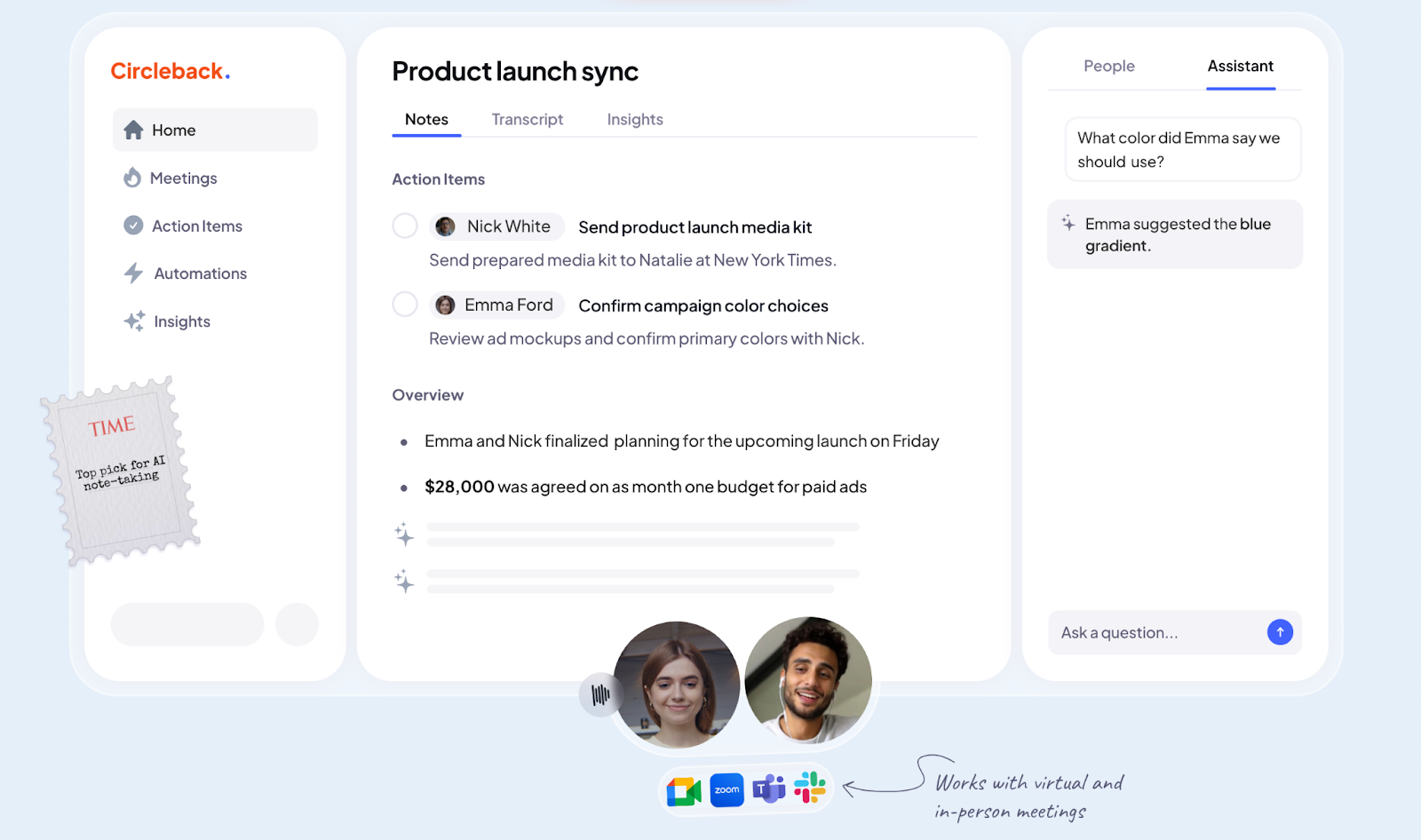
Circleback captures your Microsoft Teams conversations, and in-person ones too, through its macOS and Windows desktop app or its phone app, so no bot joins the call. Circleback can also join from your calendar as a notetaker instead, if you prefer that route. It transcribes calls, assigns action items, and intelligently organizes notes. On top of that, it supports in-person recordings and uploads, giving you full control over how your meeting content gets captured.
Who is it for?
Independent professionals, small teams, and client-facing roles who value accurate, automated meeting summaries.
Key features
Transcribes and summarizes both virtual and in-person meetings
Assigns action items, highlights key topics, and returns organized meeting recaps
AI-powered search across past meetings, with chatbot "Copilot" for quick follow-ups or writing tasks
Integrates with tools like Slack, Notion, HubSpot, Salesforce, Linear, monday.com, Zapier, and more
Supports over 100 languages and calendar syncing, and Circleback is SOC 2 Type 2 audited, HIPAA compliant, GDPR compliant and listed under the EU-U.S. Data Privacy Framework
Pricing
Individual: $25 per user per month
Team: $30 per user per month
Enterprise: Custom pricing
What Circleback users love
Action items carry their context
"Circleback is the best AI notetaker I've used. The way it summarizes the notes and includes action items with a 1-2 sentence context is fantastic." C8, G2
Joins your Teams and Zoom calls on its own
"I find Circleback really helpful because it transcribes meetings automatically, so I don't need to worry about taking notes. It's also good at knowing what meetings I have coming up and automatically joins Teams or Zoom sessions." Anthony W., G2
Handles two languages in one meeting
"The feature that allows understanding multiple languages within a single meeting is very useful." Verified User in Architecture, G2
What Circleback users flag
Soft audio loses words
"Only thing I've noticed is sometimes the transcription doesn't recognize words in the audio, especially if the audio is a bit soft." Anthony W., G2
In-person meetings need work
"There is still lots of room for improvement when it comes to presential meetings." Verified User in Architecture, G2
Weeks of downtime and slow support
"It has not been working for me for several weeks now, I have tried to reach out to support multiple times, but the answer times are very long and help I have received has not lead anywhere." Verified User in Computer Software, G2
6. Vomo AI - Speaker Labelled Transcripts in 50+ Languages From Live Audio or Uploads
Best for: Fast, accurate transcription and AI-powered note summaries without any bots interrupting your meeting
Similar to: Granola, Tactiq, and ChatGPT Record Mode.
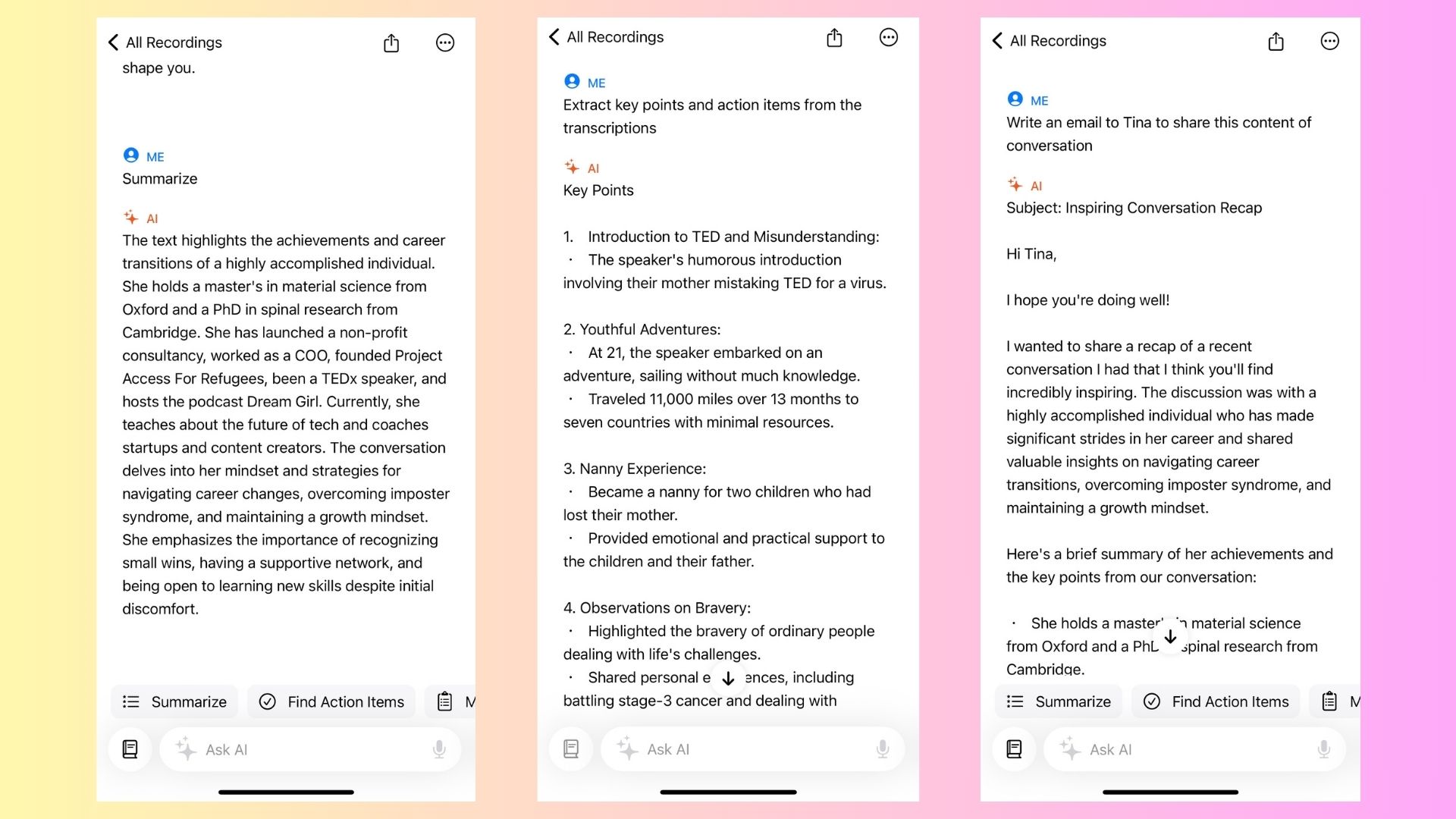
Vomo AI captures your meeting audio (whether live or uploaded) and quickly turns it into searchable transcripts, polished summaries, and structured Smart Notes. It stays out of the call, letting your meetings flow naturally while handling the note-taking in the background.
Who is it for?
Teams, professionals, and content creators who want high‑accuracy notes, easy retrieval, and deep insight generation.
Key features
Capture audio from live meetings or uploads, and generate Smart Notes including key points and action items
Ask AI feature lets you query your notes with prompts like “What are the action items?” or “Summarize key decisions”
Support for over 50 languages and automatic speaker identification
Organized cloud-based storage; folders, unlimited storage, and easy sharing
Auto-selects scene templates (meetings, brainstorms, planning) to give structure to your notes
Pricing
Free: $0, with 30 minutes of transcription per week and a 30 minute limit per uploaded file.
Pro: $4.66 per user per week on monthly billing, or $1.92 per user per week on yearly billing
What Vomo AI users love
Turns pitch meetings into structured memos
"As a VC partner seeing multiple founders daily, this tool has transformed my deal flow process. I record every pitch meeting and Vomo turns them into structured, insightful memos" a VC partner on the App Store, App Store
Summaries clear enough to decide from
"The summaries that have been provided are absolutely phenomenal! I can't emphasize enough how impressed I am with the quality and clarity of the information presented." GalaGoGo111, App Store
Transcripts reach your computer as well as your phone
"It also allows for easy publishing, allowing me to access the transcriptions & summaries from my computer." gansgshandjfkav, App Store
What Vomo AI users flag
Uploads stall before transcribing
"Really great transcripts, but recently I have noticed it not being able to flip from upload to transcribe (even when I'm on WiFi or have full cell service)." AustinB review, App Store
The wrong language on a clear recording
"Although sitting right next to the recorder and speaking clearly, it turns out, apparently, we were sometimes speaking English and sometimes speaking Japanese." Mmmrja, App Store
7. Meetily- Open Source Notetaker That Transcribes 100% on Your Own Device
Best for: Full local control over AI meeting notes with no cloud involved
Similar to: Jamie, Granola, and Circleback.
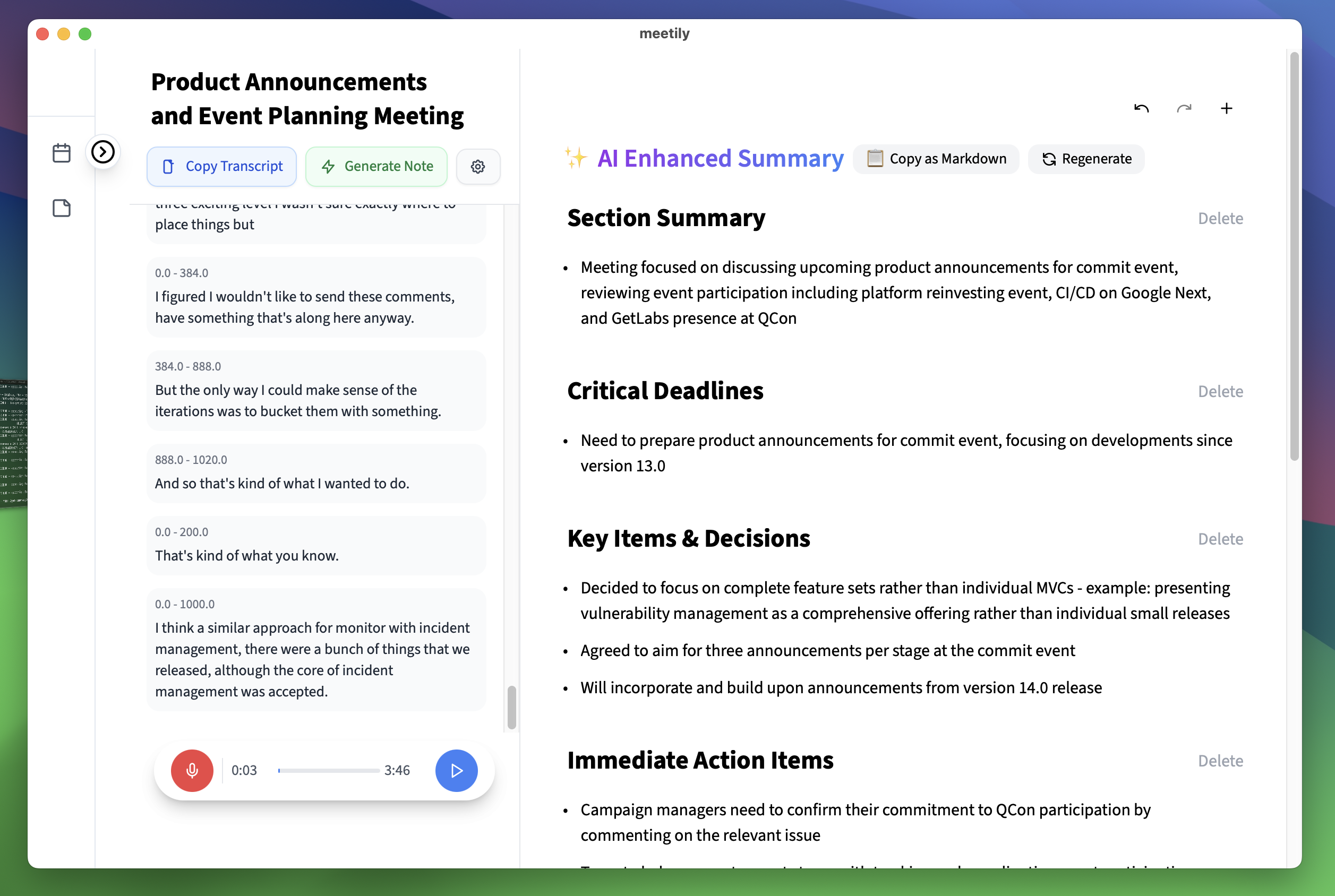
Meetily is an open-source, self-hosted AI note‑taking solution that runs entirely on your own device. It captures audio from Teams meetings (and any other platform), transcribes in real time on your own device, and generates summaries through a local AI model or your own API key.
Who is it for?
Privacy-minded teams, developers, regulated industries, and anyone who prefers complete control over their data. It's also great for organizations wanting to avoid vendor lock‑in and SaaS subscriptions.
Key features
Transcription runs 100% locally, and for summaries you pick a local AI model or your own API key
Real‑time transcription via Whisper.cpp models, plus AI-generated summaries using local or third-party LLMs like Claude, Groq, or LLaMA
Support for Windows and macOS (with Docker/Linux support in progress)
Smart highlights for key points, decisions, and action items, with full privacy by design
Open source (MIT license), with enterprise options that include support, deployment assistance, and compliance-ready features
Pricing
Community Edition: free and open source, self-hosted on your own hardware
Pro: $10 per user per month on the current early bird rate, down from $25, billed yearly at $120 per user, after a 14 day free trial. Enterprise: custom pricing from 10 user licences
What Meetily users love
Any platform, with no bot and no calendar link
"system audio capture works with any platform (zoom, meet, teams) without needing a bot or calendar integration, which was the main reason i tried it" andrew-ooo, r/LocalLLM
Live transcript keeps up on an M3 MacBook
"on my m3 macbook, parakeet keeps up with live speech without noticeable impact, and the transcription shows up word by word as the meeting happens" andrew-ooo, r/LocalLLM
The local loop is free under an MIT licence
"the community edition is free and open source under mit, which covers the full local loop" andrew-ooo, r/LocalLLM
What Meetily users flag
Speaker labels are basic on the free edition
"the speaker diarization in the free version is pretty basic" andrew-ooo, r/LocalLLM
Speaker identification is still an open request
"Being able to identify the people speaking should be a must." fayakun-it-consulting, GitHub
Local Whisper does not use the GPU
"Using Local Whisper models in the community version of Meetily does not use GPU CUDA when generating a transcription." thatcherlyoung, GitHub
8. ChatGPT Record Mode - Meeting Notes Inside the ChatGPT macOS App at No Extra Cost
Best for: One-click transcription and summaries right inside ChatGPT, with no bots and zero fuss
Similar to: Granola, Vomo AI, and Tactiq.
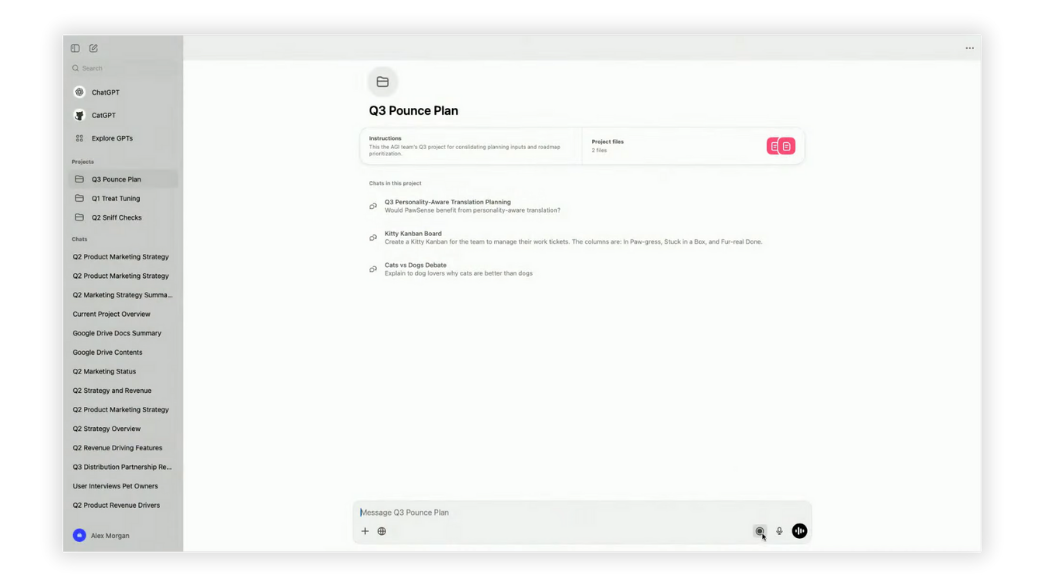
ChatGPT Record Mode captures meeting audio directly through the macOS ChatGPT app: no third-party tools or extra participants needed. Just tap "Record," let it run, then get an editable summary, action items, and a transcript saved as a Canvas in your chat history. Everything stays neatly inside ChatGPT, making it easy to revisit later.
Who is it for?
Teams already using ChatGPT for work who want quick, in-app meeting recaps without extra apps.
Key features
Audio capture within ChatGPT macOS app, auto-generating a Canvas with summaries and action items
Each recording session runs up to 4 hours, or 240 minutes, and the audio is deleted after transcription
Global search can query past recordings and jump to the relevant moment in your Canvas
Audio is deleted after transcription and never trains models, and on Free, Plus and Pro accounts the transcripts and canvases may train models unless you turn off Improve the model for everyone
Pricing
Included at no extra cost on Plus, Pro, Business, Enterprise and Edu workspaces, and only in the macOS desktop app
What ChatGPT Record Mode users love
Recording, transcript and summary in the same app
"In the former ChatGPT macos app, I could start a meeting recording and receive a transcript and summary." Attila_Balogh, OpenAI community
Useful for minutes and action items at work
"I use ChatGPT Business as part of my administrative work, including preparing meeting transcripts, summaries, action items, and formal minutes. Record mode would be extremely useful" lgraham_LTCAM, OpenAI community
What ChatGPT Record Mode users flag
macOS only, so Windows and iPhone are out
"Record mode would be extremely useful, but limiting it to the macOS desktop app excludes Windows-based" lgraham_LTCAM, OpenAI community
It went missing after the app update
"After upgrading to the new unified ChatGPT / Codex macos app, I can no longer find the previous ChatGPT Record mode used for recording and summarizing meetings." Attila_Balogh, OpenAI community
Every recording opens a new chat
"In previous versions, I could create multiple recordings inside the same chat thread." IgnacioMM, OpenAI community
9. Tactiq - Live Microsoft Teams Transcripts From a Chrome or Edge Extension
Best for: Real-time meeting transcripts and customizable AI workflows
Similar to: Bluedot, Granola, and Jamie.
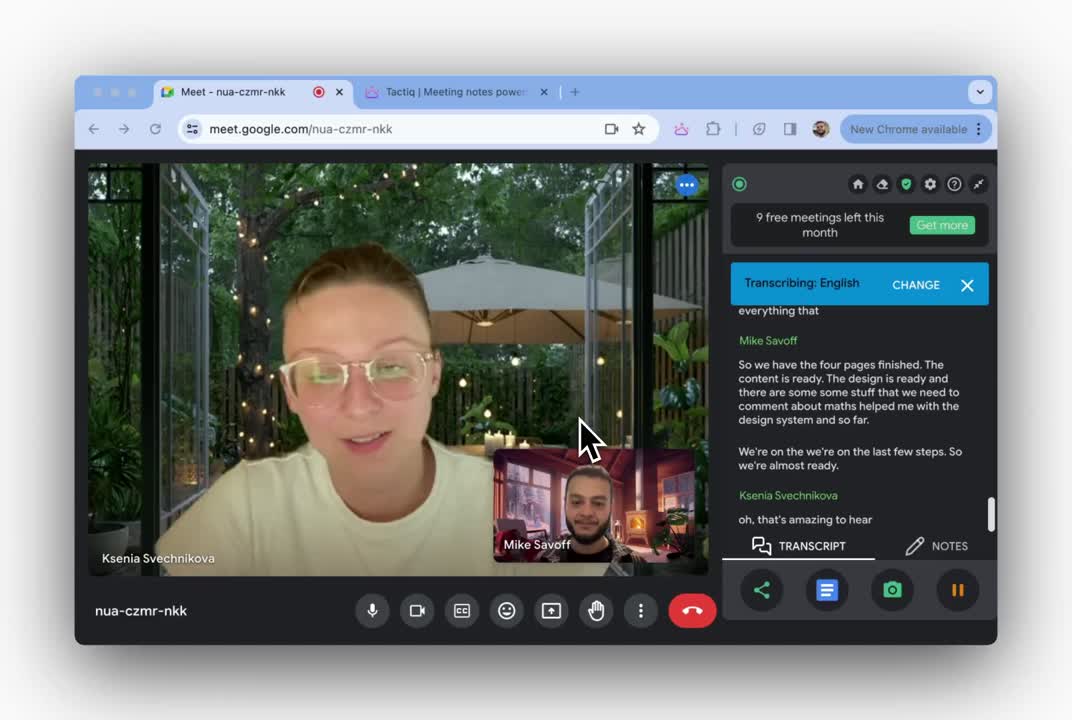
Tactiq works as a straightforward Chrome extension that quietly captures your Teams meeting audio, transcribes it live, so you can tag highlights or extract summaries, without inviting a bot into the call. It’s especially useful if you prefer in-browser tools that integrate neatly into workflows.
Who is it for?
Individuals and small teams wanting live transcription and AI-powered insights
Key features
Live transcription and AI-powered summaries, all within Teams, Zoom, or Google Meet
One-click generation of action items and meeting highlights
Customizable AI workflows and reusable templates to automate tasks like drafting follow-up emails or creating Jira tickets
Supports multiple languages and tags to enrich your transcripts
Pricing
Free: $0, with 10 transcripts and 5 AI credits a month
Pro: $12 per user per month
Team: $20 per user per month
Business: $40 per user per month
For more details, check our Tactiq pricing guide.
What Tactiq users love
No bot added to the call
"Tactiq generates transcripts and summaries of online meetings without adding a bot the call." Verified User in Information Technology, G2
Action items ready right after the call
"It lets me stay fully focused on the conversation instead of worrying about taking notes. The AI summaries and action items make it easy to capture the key takeaways quickly after each meeting." Nasreen M., G2
Past recordings can be uploaded
"Tactiq is easy to implement and its interface is very user-friendly. Additionally, it has a functionality that allows you to upload past audios and improves transcription." Freddy A., G2
What Tactiq users flag
No recording, and the browser is required
"It also lacks advanced features like recording and deeper analytics, which limits its usefulness for detailed insights. Additionally, the free plan restrictions and browser dependency can be a bit limiting." Nasreen M., G2
Accents trip up the transcript
"Sometimes the tool misunderstands non-native English speakers, which can affect the accuracy of transcripts." Sabri S., G2
Spanish transcription is basic
"Tactiq transcription from Spanish is quite basic." Freddy A., G2
Also read: 10 Best Tactiq AI Alternatives & Competitors in 2026
10. Bluedot - Bot Free Notes in 100+ Languages That Sync to Salesforce and HubSpot
Best for: Sales and client-facing teams that need secure notes directly connected to their CRM
Similar to: Jamie, Tactiq, and Circleback.
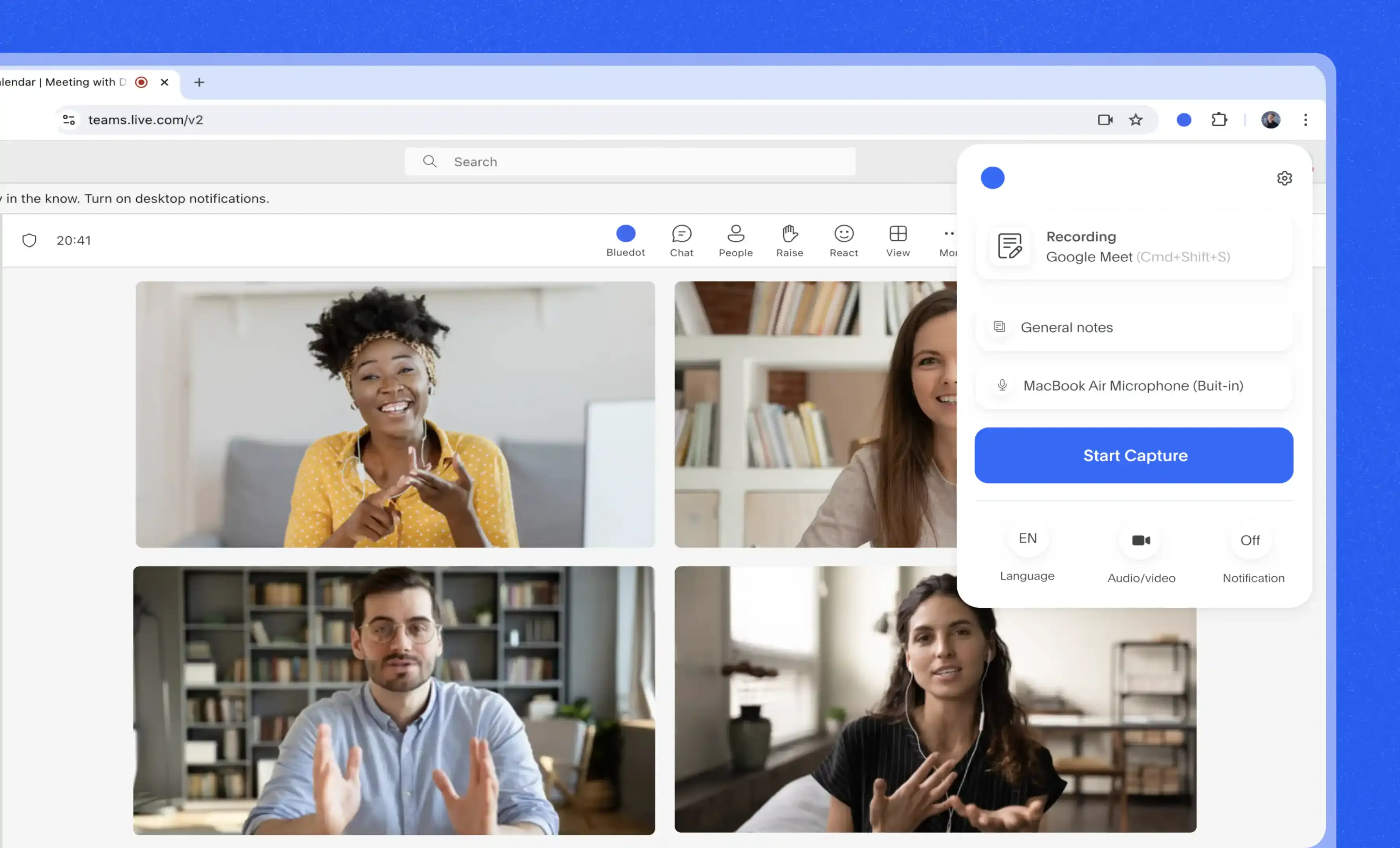
Bluedot makes it easy to capture and summarize Teams meetings without adding another participant to the call. Running from a Chrome extension or the Bluedot desktop and mobile apps, it transcribes your conversations, highlights key points, and drafts follow-up emails in seconds. With built-in integrations for Salesforce, HubSpot, and Slack, it’s a natural fit for teams that want their notes to flow directly into their existing workflows.
Who is it for?
Revenue teams, recruiters, and remote professionals who want accurate meeting notes tied directly into CRMs and collaboration tools without disrupting the call.
Key features
Records and transcribes Teams, Zoom, Meet, and Webex meetings from a browser extension
Supports 100+ languages with strong transcription accuracy
Integrates with HubSpot, Salesforce, Notion, and Slack
Customizable templates and AI chat for querying past notes
Pricing
Free: $0
Basic: $18 per user per month
Pro: $25 per user per month
Business: $39 per user per month
What Bluedot users love
No bot to invite and no record button to press
"I love how Bluedot automates meeting notes and action items without any manual setup." Alena R., G2
No-bot recording inside a fintech team
"The most convenient thing about Bluedot would have to be its no-bot approach to recording." Brian D., G2
Covers in-person seminars as well as calls
"As a graduate student juggling online and in-person seminars, Bluedot has become an essential tool in my academic workflow." KT, G2
What Bluedot users flag
Speakers come back as A and B
"Speaker tagging could be improved" BF, G2
The free version runs out fast
"The main issue I have is that the free version is quite limited." lenia r., G2
Recordings lock the moment you unsubscribe
"After unsubscribing, I immediately couldn't access my recordings, which other note-taking software doesn't do." Paul M., G2
Final Verdict on What's the Best 10 Bot-Free Notetakers for Microsoft Teams?
The best bot-free notetaker for Microsoft Teams depends entirely on what you need right now; if it's a notetaker nobody has to admit into a client call, and meeting data that stays in Europe for the officer who signs the tool off, then, Jamie can be the best choice among the bot-free notetakers for Microsoft Teams. Let's do a quick recap of what Jamie does for you:
Privacy and Preserving Natural Conversation: Jamie records your Microsoft Teams, Zoom and Google Meet calls from your own device, without intrusive bots.
Advanced Technology Used For Speaker Diarization: Jamie scored 90 for transcription and 98 for speaker identification in our own accuracy test against four other AI note takers.
Rooted Privacy Laws and Highest Security: Jamie is GDPR compliant and ISO 27001 certified, stores and processes all meeting data in Europe, and is DORA-ready.
Values One's Privacy and Keeps AI Training Out of It: Jamie deletes your meeting audio once the transcript is generated, and neither Jamie nor our model providers train on it.
Built to Be More Than A Meeting Assistant:Jamie has built in Agentic Intelligence with components like Agent, Connectors, Skills and MCP.
Microsoft Teams Copilot deserves real credit here, because Facilitator generates real-time notes inside the meeting that everyone can co-author, with no extra app to install. The trade is the licence and the scope Microsoft publishes: Facilitator needs a Microsoft 365 Copilot licence, listed by Microsoft at $18.00 per user per month paid yearly, or $25.20 billed monthly, and it can only be added to scheduled meetings, not channel meetings, instant meetings or Teams calls.
You can also pick a different tool when the job is different:
Choose Granola when you want to keep writing your own rough notes, because Granola enhances them after the call and its Basic plan is free with the last 30 days of meeting history.
Choose Krisp when background noise is the problem, because Krisp cancels noise on both sides of the call and converts accents from $16 per user per month.
Choose Circleback when you want automations after every meeting, because Circleback is SOC 2 Type 2 audited, HIPAA compliant and supports over 100 languages from $25 per user per month.
Choose Vomo AI when most of your recording happens on your phone, because Vomo labels speakers, supports 50+ languages, and its free plan carries 30 minutes of transcription a week.
Choose Meetily when the transcript may never leave your device, because Meetily transcribes 100% locally and its Community Edition is free and open source.
Choose ChatGPT Record Mode when your team already works inside ChatGPT, because Record is included at no extra cost on Plus, Pro, Business, Enterprise and Edu, on the macOS app only.
Choose Tactiq when you want a live transcript inside the browser, because Tactiq runs from a Chrome or Edge extension and its free plan includes 10 transcripts a month.
Choose Bluedot when your notes have to land in the CRM, because Bluedot syncs to Salesforce and HubSpot and transcribes in 100+ languages.
For everything else, Jamie records without a bot in your Microsoft Teams call; Jamie stores and processes your meeting data in Europe, GDPR compliant and ISO 27001 certified; and Jamie generates your notes, transcript and action items in under 30 seconds, on every plan including our free plan.
Download Jamie for free to experience it yourself!
Or if you’d like to see the tool in action before making a move, book a free demo.
Read More
FAQs on the Best Bot-free Notetakers for Microsoft Teams
What are bot-free notetakers?
Bot-free AI notetakers capture meeting notes without bots joining your calls as a visible meeting participant. Instead, they run quietly in the background of Microsoft Teams meetings, video calls, or other virtual meetings, generating AI meeting notes from live meetings, sales calls, or internal meetings. Unlike a meeting bot, they don’t disrupt the flow of the meeting discussion; they simply transcribe meetings, capture key moments, and create AI summaries afterward.
How do bot-free notetakers work in Microsoft Teams?
A bot-free AI meeting assistant works directly within your device, recording and processing audio files or video recording from Teams meetings without appearing as another participant. After the session, it produces meeting transcripts, meeting recaps, and detailed notes. These tools often include AI-powered summaries and highlight key insights, so your entire team can quickly revisit important detail, summarize key points, and plan upcoming meetings.
What makes bot-free note-taking different from manual note taking?
Hand-written or manual notes often miss critical points during meetings organized across multiple teams. A bot-free AI assistant can deliver accurate transcripts, generate AI note highlights, and provide meeting insights from meeting transcriptions in seconds. Instead of spending hours on manual note-taking, your team gets AI generated notes that speed up follow ups and improve your team's productivity.
Who benefits most from AI meeting notes?
Bot-free AI meeting assistants are valuable for founders, consulatants, sales teams, customer success teams who need instant meeting recaps from sales calls and online meetings. They’re equally helpful for remote teams handling virtual meetings, video conferencing, or Google Meet sessions. Whether it’s internal meetings or client-facing teams meetings, these tools ensure nothing is lost in translation by delivering a complete transcript and ready-to-use meeting summaries.
What features should I look for in a bot-free AI notetaker?
The best AI notetakers combine real time transcription and AI chat for fast answers. They should also offer AI generated notes and support integrations with tools like Google Docs to easily share meetings with your entire team.
Are bot-free notetakers secure enough for sensitive meetings?
Yes. Leading tools like Jamie prioritize strong security controls so that during internal meetings, sales calls, or investor meetings, your team can share information safely. With GDPR-compliant processes and encrypted handling of audio files, Jamie ensures every meeting transcription stays private. Unlike a typical meeting bot, it doesn’t store recordings permanently.

![10 Best Bot-Free AI Meeting Assistant [2025]](/api/media/payload/10_Best_Bot-Free_AI_Meeting_Assistant_2025-41eaqp.png)
![Granola vs Superpowered vs Krisp vs Jamie: Which Bot-Free Notetaker Is Best? [2025]](/api/media/payload/Granola_vs_Superpowered_vs_Krisp_vs_Jamie_Which_Bot-Free_Notetaker_Is_Best_2025-s6hbm3.png)